• About
  • Contact
  • Disclaimer
  • Sitemap
  • Privacy Policy
  • Terms Of Service
Information Technology for You
  • Home
  • Guides
  • ChromeOS
  • MacOS
  • Windows
  • Utilities
  • Reviews
  • Tech Basics
    • Hardware
    • Software
    • Operating System
    • Networking
No Result
View All Result
  • Home
  • Guides
  • ChromeOS
  • MacOS
  • Windows
  • Utilities
  • Reviews
  • Tech Basics
    • Hardware
    • Software
    • Operating System
    • Networking
No Result
View All Result
Intechfy
No Result
View All Result

Top New iOS 27.2 Features You Should Try Right Now

Ethan Carter by Ethan Carter
October 29, 2026
Home MacOS
Share on FacebookShare on Twitter

Apple has launched the stable version of iOS 27.2, bringing significant upgrades to the iPhone ecosystem alongside updates for macOS, iPadOS, watchOS, and tvOS. This first major iteration of the iOS 27 cycle introduces a range of iOS 27.2 features that enhance artificial intelligence capabilities and improve the user experience on secondary devices like HomePod and Apple TV.

Table of Contents

Toggle
  • What happened to iOS 27.1?
  • Siri AI expansion and iOS 27.2 features
  • Apple TV profiles
  • Sound Glow on HomePods
  • App Switcher on watchOS
  • Apple Pencil support for iPhone Duo
  • Where’s the new Health app?

What happened to iOS 27.1?

Users might notice the jump from iOS 27.0.1 directly to 27.2. This gap exists because iOS 27.1 was a specialized release restricted to the new iPhone Duo hardware. By keeping that version in-house and for early adopters, Apple managed to support its folding device without exposing specific features to the broader public before the hardware launch.

Since iOS 27.2 supports all compatible devices, including the Duo, the previous version remains a niche footnote in Apple’s software history. iPhone Duo users who recently unboxed their devices are encouraged to move to this stable build immediately. This ensures that all hardware variants are now running on a unified software branch.

Siri AI expansion and iOS 27.2 features

The initial launch of Siri AI in iOS 27.0 introduced a dedicated chatbot and personal data integration, but it was limited to English speakers. The iOS 27.2 features now include official support for French, Spanish, Portuguese, Japanese, and Korean. This expansion allows a wider global audience to interact with the assistant using voice commands and the main chatbot interface in their native languages.
Top New iOS 27.2 Features You Should Try Right Now

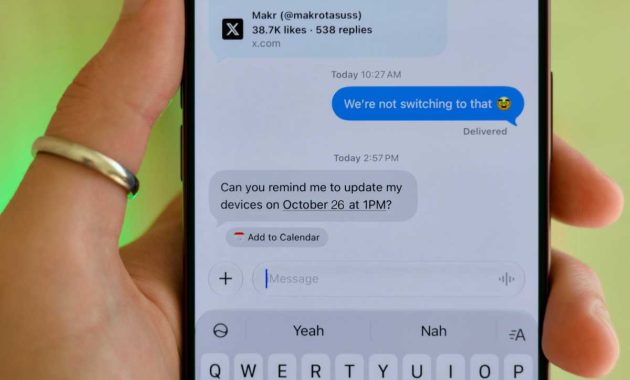
Beyond language, the assistant now provides contextual suggestions within the Messages app. If a text mentions a specific date or time, Siri surfaces a shortcut to create a Calendar event immediately. The Phone app also benefits from improved Call Context, which now alerts users to saved anniversaries alongside existing birthday reminders.

Furthermore, Siri can now recall information from previous queries even when users start a new interaction outside the dedicated Siri app. This continuity makes the AI feel more like a persistent assistant rather than a series of isolated interactions. The update also extends Siri AI to the second-generation Apple TV 4K and subsequent models by linking with a nearby iPhone to process requests.

Apple TV profiles

One of the most requested additions in this update is the introduction of multiple viewer profiles within the TV app. Much like popular streaming competitors, users can now create distinct profiles under a single Apple Account. This allows family members sharing a device to maintain separate watch histories and queues without interfering with the primary user’s recommendations.

Primary account holders retain full control over these secondary profiles, including the ability to manage or delete them. Each profile can be customized with a unique name and avatar, and security features like a 4-digit PIN can be applied. Additionally, parents can use these profiles to restrict adult content and set specific autoplay preferences for younger viewers.
Top New iOS 27.2 Features You Should Try Right Now

This update does not change how Family Sharing works for separate Apple Accounts. It specifically addresses situations where multiple people use the same physical iPhone or iPad to watch content. It ensures that your personal “Up Next” list remains accurate even if you let someone else borrow your device for a movie.

Sound Glow on HomePods

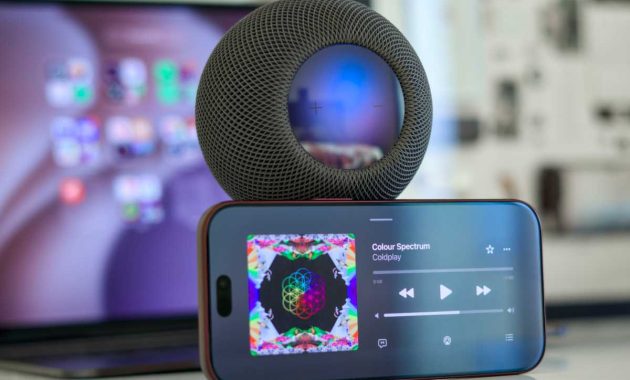
HomePod users, excluding those with the original 2018 model, gain a new visual enhancement called Sound Glow. Controlled through the Home app, this feature converts album art into a dynamic color field that pulses on the top display in time with the music. It provides a more immersive atmosphere, particularly in low-light settings where the light reflects more dramatically.

The update also addresses hardware reliability with a new Lock Controls toggle. This setting allows users to completely disable the touchscreen on the top of the HomePod. This is a practical solution for older units experiencing “ghost touches” that trigger unintended playback or volume changes.

App Switcher on watchOS

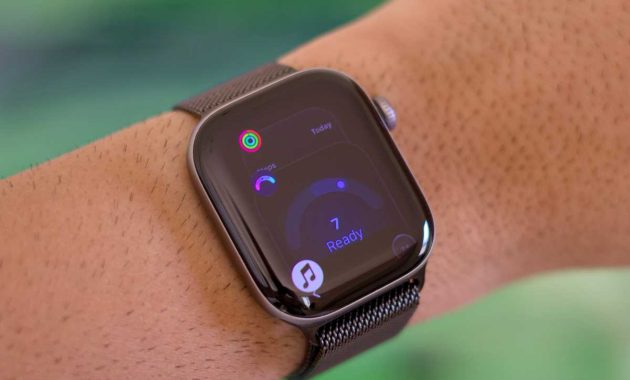
Apple Watch users will see the return of the App Switcher in watchOS 27.2, a feature that was notably absent in the initial release. The method for accessing it has changed to accommodate future hardware features. Instead of the traditional crown double-click, users must now press and hold the bottom of the screen while inside an active application.
Top New iOS 27.2 Features You Should Try Right Now

This change frees up the double-click gesture for the upcoming Live Rewind feature expected on the Series 12 later this year. By restoring the switcher, Apple allows users to once again force-quit applications that are frozen or consuming excessive battery. It represents a compromise between evolving navigation and maintaining essential utility.

Apple Pencil support for iPhone Duo

The newly released iPhone Duo receives immediate hardware compatibility improvements in this update. Users can now utilize the USB-C Apple Pencil on either of the device’s screens, with the ability to magnetically attach the stylus to the side. This effectively turns the folding phone into a compact digital notebook or canvas.

However, because this specific pencil model lacks pressure sensitivity and certain gesture controls, the experience differs slightly from the Apple Pencil Pro on iPad. Users will not be able to use the double-tap or squeeze functions found on higher-end models. Despite these limitations, the addition of precise stylus input significantly expands the Duo’s productivity potential.

Where’s the new Health app?

During the beta phase, testers saw a redesigned Health app that promised a more modern interface. While this redesign is missing from the final iOS 27.2 release, it remains part of Apple’s roadmap for the current year. Current projections suggest the overhaul will likely debut with iOS 27.3 in December.

Even for users who do not utilize smart home features or AI assistants, this update remains a critical installation. It includes over 150 security patches and various bug fixes that stabilize the overall system performance. Navigating these iOS 27.2 features requires an iPhone 11 or newer, and the update can be initiated through the General section of the Settings app.


Views: 40

Share this:

Related posts:

  • The Touchscreen MacBook Pro Completes the Evolution Started by the Touch Bar

  • iOS Versions: Exploring Every Release from Day One to Today

  • New Apple Products Coming in 2026 and 2027: What’s Next for Mac, iPhone, and iPad

Ethan Carter

Ethan Carter

Ethan Carter is a tech writer focused on Windows optimization, lightweight software, and practical PC troubleshooting. He enjoys testing utilities, improving low-end PC performance, and sharing simple tech solutions that help everyday users get more from their devices.

Next Post
PowerPoint Presenter View Not Working? How to Fix It in Microsoft PowerPoint

PowerPoint Presenter View Not Working? How to Fix It in Microsoft PowerPoint

Leave a Reply Cancel reply

Your email address will not be published. Required fields are marked *

Recommended.

Why Wrong Wi-Fi Bands Slow Your Devices and How to Fix It

Why Wrong Wi-Fi Bands Slow Your Devices and How to Fix It

October 26, 2026
iPhone Duo Guide: Price, Specifications, Availability, and Reviews

iPhone Duo Guide: Price, Specifications, Availability, and Reviews

October 26, 2026

Trending.

Microsoft PC Manager Review: Surprisingly Useful, But Not the PC Booster You Expect

Microsoft PC Manager Review: Surprisingly Useful, But Not the PC Booster You Expect

June 16, 2026
Is CCleaner Worth It in 2026? Honest Review After Testing It on Modern Windows PCs

Is CCleaner Worth It in 2026? Honest Review After Testing It on Modern Windows PCs

June 17, 2026
What to Expect at Apple’s October 28 Pro and Tell Event

What to Expect at Apple’s October 28 Pro and Tell Event

October 25, 2026
iPad mini (A20 Pro): Release Date, OLED, Price, and Specifications

iPad mini (A20 Pro): Release Date, OLED, Price, and Specifications

October 29, 2026
12 Best PC Boosters for Gaming, Low-End PCs, and Everyday Performance

12 Best PC Boosters for Gaming, Low-End PCs, and Everyday Performance

June 17, 2026
How to Update Your BIOS (UEFI)

How to Update Your BIOS (UEFI): When You Should, When You Shouldn’t, and How to Do It Safely

October 25, 2026
7 Best Free Antivirus for Windows 11 Ranked by Performance and Security

7 Best Free Antivirus for Windows 11 Ranked by Performance and Security

June 19, 2026
What Is Programming Software? Types, Functions, and Best Tools for Beginners

What Is Programming Software? Types, Functions, and Best Tools for Beginners

June 14, 2026
Windows 11 version 26H2 Now Broadly Available for Eligible Devices

Windows 11 version 26H2 Now Broadly Available for Eligible Devices

October 26, 2026
20 Operating System Examples Categorized by Device and Purpose

20 Operating System Examples Categorized by Device and Purpose

June 27, 2026
How to Fix a USB Device That Keeps Disconnecting

How to Fix a USB Device That Keeps Disconnecting

October 26, 2026
How to Resize the Windows 11 Start Menu With New Built-In Controls

How to Resize the Windows 11 Start Menu With New Built-In Controls

October 26, 2026
PowerToys 0.102 Adds Mouse Utilities, Quick Commands, and Dictation

PowerToys 0.102 Adds Mouse Utilities, Quick Commands, and Dictation

October 27, 2026
Best Free Screen Recorders for Windows We Tested No Watermarks, No Time Limits

9 Best Free Screen Recorders for Windows We Tested in 2026 (No Watermarks, No Time Limits)

June 23, 2026
macOS 27 Golden Gate: What’s New, Compatible Macs, and Features

macOS 27 Golden Gate: What’s New, Compatible Macs, and Features

October 29, 2026
What Is a Distributed Operating System? Architecture, How It Works, Functions, Benefits, and Examples

What Is a Distributed Operating System? Architecture, How It Works, Functions, Benefits, and Examples

June 27, 2026
8 Best Driver Updater Software for Windows: Free and Paid Options Compared

8 Best Driver Updater Software for Windows: Free and Paid Options Compared

July 2, 2026
Microsoft Project Zenith: A Developer-Ready Windows 11 Experience

Microsoft Project Zenith: A Developer-Ready Windows 11 Experience

October 26, 2026
Microsoft Tests Cleaner, Faster File Explorer Context Menu for Windows 11

Microsoft Tests Cleaner, Faster File Explorer Context Menu for Windows 11

October 26, 2026
Internal Hardware of a Computer: Definition, Components, and How Internal Computer Hardware Works

Internal Hardware of a Computer: Definition, Components, and How Internal Computer Hardware Works

March 9, 2026
Microsoft Tests Controller-Friendly Gaming Task View for Windows 11

Microsoft Tests Controller-Friendly Gaming Task View for Windows 11

October 26, 2026
Touchscreen MacBook Pro Rumors: OLED, Design and Release Date

Touchscreen MacBook Pro Rumors: OLED, Design and Release Date

October 29, 2026
Global PC Shipments Plunge Over 20 Percent Amid Rising Component Costs

Global PC Shipments Plunge Over 20 Percent Amid Rising Component Costs

October 25, 2026
iOS 27 Features, Compatibility, and Siri AI Overview

iOS 27 Features, Compatibility, and Siri AI Overview

October 29, 2026
Can You Run Regular Ethernet Cables Outside?

Can You Run Regular Ethernet Cables Outside?

October 26, 2026
Apple Unveils Thinner, Lighter iPad mini (A20 Pro) with OLED Screen and Major Power Boosts

Apple Unveils Thinner, Lighter iPad mini (A20 Pro) with OLED Screen and Major Power Boosts

October 29, 2026
Best CPU Temperature Monitor Tools for Gaming and Real-Time Tracking

7 Best CPU Temperature Monitor Tools for Gaming and Real-Time Tracking

May 31, 2026
What Does MLO Mean on Your Router and Should You Enable It?

What Does MLO Mean on Your Router and Should You Enable It?

October 26, 2026
What Is a Device Driver in a Computer? Functions, Types, How It Works, and Examples

What Is a Device Driver in a Computer? Functions, Types, How It Works, and Examples

July 2, 2026
How to Troubleshoot and Fix Word Mail Merge Errors

How to Troubleshoot and Fix Word Mail Merge Errors

October 28, 2026
Intechfy

Intechfy.com is a technology-focused information platform created to make everyday tech concepts easier to understand, more practical, and more accessible.

  • About
  • Contact
  • Disclaimer
  • Sitemap
  • Privacy Policy
  • Terms Of Service

© 2026 Intechfy.com - Information Technology for You

No Result
View All Result
  • Home
  • Guides
  • Utilities
  • Reviews
  • Tech Basics
    • Computer
    • Hardware
    • Software
    • Operating System
    • Networking

© 2026 Intechfy.com - Information Technology for You