
Microsoft is laying the groundwork for a more centralized operating system experience in Windows 11. Recent preview builds indicate that the tech giant is testing a dedicated hub designed to manage software from outside the Microsoft ecosystem, tackling a long-standing point of friction for power users and everyday consumers alike.
While the feature remains in its infancy, understanding how it operates reveals a notable shift in how Windows handles background software maintenance.
A Centralized Hub for Third-Party Software
A new “App updates” page has been spotted within Windows 11 Settings. Located at Settings > Apps > App updates in a Windows 11 26H2 preview build, the page is intended to collect update checks for third-party applications in one unified location.
Although reports point to examples like Java utilizing this infrastructure, Microsoft’s official documentation on the underlying platform does not independently confirm this exact UI path or specific third-party app examples. Furthermore, because the feature is currently in early testing, the preview page lists no registered providers, and its manual update-check control remains disabled.
How the Update Orchestration Platform (UOP) Works
The interface relies on the Update Orchestration Platform (UOP), a backend framework that Microsoft introduced as a private developer preview in May 2025. UOP acts as a coordinator rather than a traditional app store or standalone installer.
- Developer Opt-In: App developers must explicitly register their software as an “update provider” using Windows Runtime APIs or PowerShell.
- External Hosting: The app’s own update server and installer remain completely unchanged; Windows simply coordinates the process.
- OS Management: Once registered, Windows handles notifications, installation timing, restart scheduling, and update history.
The overarching goal is to reduce “updater fatigue.” Constant background pop-ups from dozens of individual desktop utilities waste system resources and train users to blindly click through notifications without reading them.
Platform vs. Interface: When Will You See It?
It is important to distinguish between the backend UOP technology and the frontend Settings interface. Microsoft’s notes place the general availability of the underlying UOP platform in August 2026 for Windows 11 versions 25H2, 24H2, and 26H1. However, the dedicated Settings page itself has only surfaced in a 26H2 preview build.
Because servicing documentation notes that 24H2 stopped receiving preview updates in October 2026, everyday users will not immediately see these changes. For most people, the page will remain an “empty room” until third-party vendors begin adopting and registering their software with the platform.
Benefits for Users and IT Administrators
When fully realized, unified app management offers distinct advantages depending on who is using the machine.
- Consumer Benefits: Fewer intrusive background updaters nagging you with independent notifications while trying to work or play.
- IT Administrator Benefits: Management-tool vendors and enterprise admins can leverage UOP policies to enforce strict update deadlines and restart rules across corporate fleets.
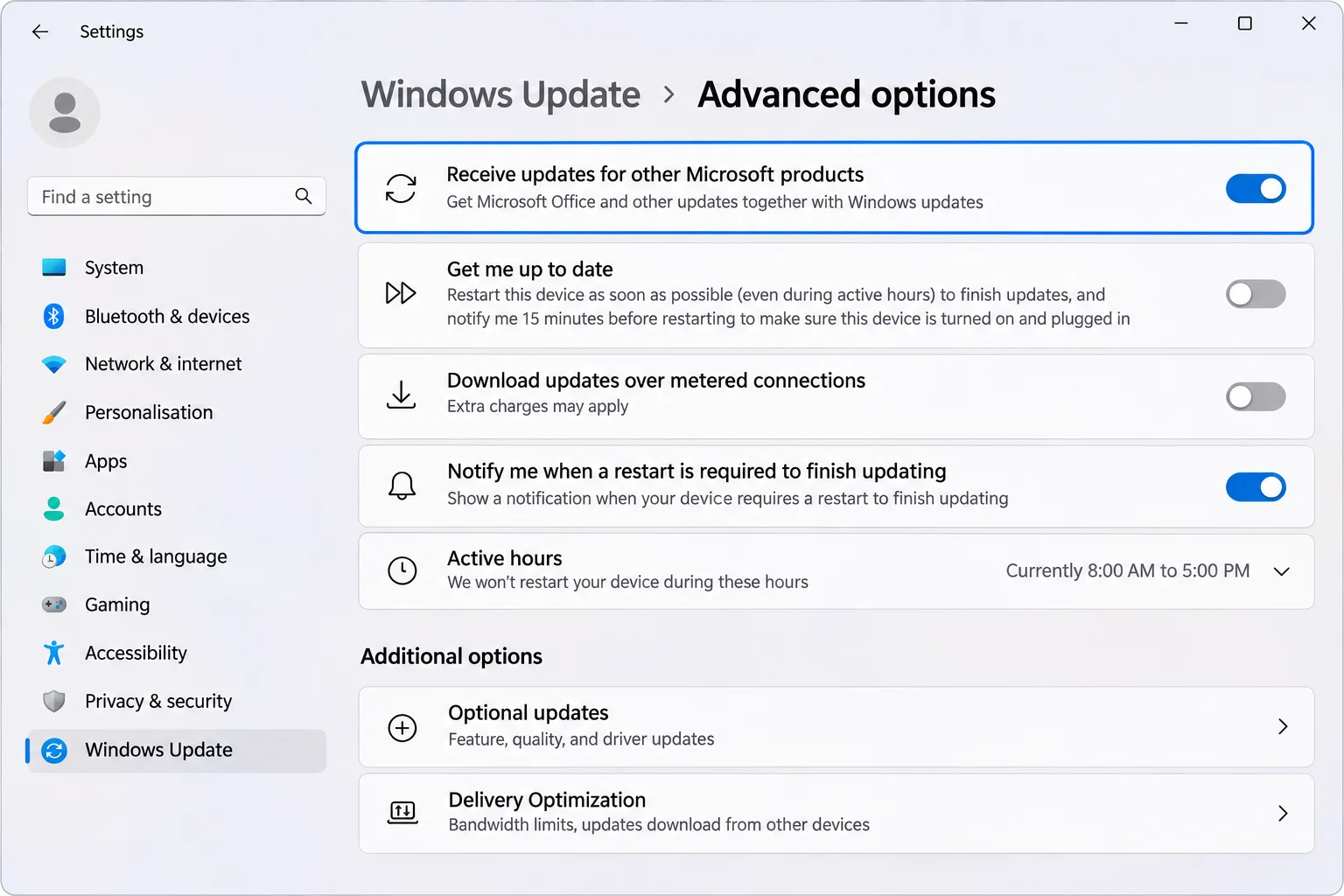
This approach closely mirrors the existing “Microsoft products” toggle within Windows Update, which extends operating system updates to software like Office. UOP aims to expand that convenience to everyone else’s applications, provided developers choose to participate.
Here is how UOP compares to existing channels:
| Update Channel | Primary Focus | Developer Requirement |
|---|---|---|
| Windows Update | Core OS and Microsoft software (e.g., Office) | Managed directly by Microsoft |
| Microsoft Store | Packaged apps distributed via the Store ecosystem | Store submission and packaging guidelines |
| Update Orchestration Platform (UOP) | Traditional third-party desktop applications | Developer opt-in via Windows Runtime APIs/PowerShell |
Frequently Asked Questions
Is this a new Microsoft app store?
No. Based on Microsoft’s description of UOP, apps continue to download updates directly from their own servers. Windows merely coordinates the timing and notifications.
Will Java or my browser stop nagging me?
Only if the specific app developer registers as a UOP provider. Until that happens, the application’s native updater will continue running as it always has.
Can I manually turn it on or off?
Turning UOP on is a developer-side action. Microsoft’s published documentation does not currently feature a dedicated toggle for end users to manually enable or disable the platform.
Does it replace Windows Update or the Store?
No. Both Windows Update and the Microsoft Store will continue functioning normally alongside UOP.
Ultimately, the plumbing is in place, but the true test of Windows 11 third-party app updates rests entirely on developer adoption. Users running preview builds can check their versions via Settings > System > About, though experimenting with preview software is best left to virtual machines or secondary test laptops.