
Microsoft is testing a long-awaited solution to permanently stop the “Sticky Keys” prompt that appears when you press the Shift key five times in a row. For now, the new option is rolling out exclusively in Windows 11 Insider Preview builds.
Microsoft Tests Permanent Fix for Sticky Keys Pop-Ups
The feature arrives in Beta Channel Build 26320.9876 and Experimental Channel Build 26340.9882, both released on November 6, 2026, according to Microsoft’s official release notes. Both builds are based on Windows 11, version 26H2, and are delivered through an enablement package. As with any Insider feature, Microsoft cautions that the option could change or never ship beyond the preview program.
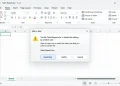
Microsoft’s updated dialog boxes for both Sticky Keys and Filter Keys will allow users to choose not to be asked again directly from the prompt. Until now, choosing “No” on either prompt only dismissed it temporarily. If a user triggered the combination again, the pop-up would return unless they had manually turned off the keyboard shortcut in Windows Settings. The Filter Keys prompt, which appears when holding the right Shift key for eight seconds, is receiving the same treatment.
How the New Prompt Option Works
For gamers and fast typists who frequently trigger shortcuts by accident, the pop-up has long been a minor annoyance. The new checkbox puts the off switch directly into the dialog users are already looking at, eliminating the need to hunt through system menus.
Because the update on the Experimental channel is rolling out via a Controlled Feature Rollout, some Insiders may not see the option right away even after updating their build. Microsoft notes that the core functionality of Sticky Keys and Filter Keys remains unchanged under Settings; only the behavior of the warning prompts is being updated.
How to Stop Sticky Keys Prompts on Stable Windows 11 Today
If you are using a stable version of Windows 11 and want to stop the pop-ups immediately without joining the Insider program, you can disable the underlying shortcut today. Follow these steps to adjust your configuration:
- Open Windows Settings.
- Navigate to Accessibility and select Keyboard.
- Locate the shortcut toggles within the Sticky Keys and Filter Keys sections and turn them off.
This workaround stops the shortcut from bringing up the prompt on stable builds without requiring you to run preview software on your primary machine. If you are already enrolled in the Beta or Experimental channel, simply check the box the next time the prompt appears. Users who wish to test preview builds should always use a spare PC or virtual machine and create a complete backup before enrolling, as preview builds can occasionally introduce instability.