• About
  • Contact
  • Disclaimer
  • Sitemap
  • Privacy Policy
  • Terms Of Service
Information Technology for You
  • Home
  • Guides
  • ChromeOS
  • MacOS
  • Windows
  • Utilities
  • Reviews
  • Tech Basics
    • Hardware
    • Software
    • Operating System
    • Networking
No Result
View All Result
  • Home
  • Guides
  • ChromeOS
  • MacOS
  • Windows
  • Utilities
  • Reviews
  • Tech Basics
    • Hardware
    • Software
    • Operating System
    • Networking
No Result
View All Result
Intechfy
No Result
View All Result

Windows 11 Tests Customizable Context Menus, Speed Tests & Privacy Controls

Ethan Carter by Ethan Carter
November 3, 2026
Home Windows
Share on FacebookShare on Twitter

Microsoft is actively testing new capabilities within Windows 11 Insider Preview builds, giving users a glimpse into potential operating system updates. Evaluated across different testing tracks in late October 2026, these updates range from interface refinements to utility additions. Understanding what Microsoft officially acknowledges versus what relies on independent reporting helps clarify the current state of development.

Table of Contents

Toggle
  • Overview of Windows 11 Insider Preview Features
  • Breaking Down the Four New Features
  • Understanding Windows Insider Channels and Builds
  • What Stable Release Users and IT Support Need to Know
  • Should You Join the Insider Program?

Overview of Windows 11 Insider Preview Features

As of November 2, 2026, Microsoft is testing four notable features across various Windows 11 Insider Preview channels: a customizable right-click context menu, a built-in internet speed test, a resizable Start menu, and per-app privacy controls tailored for traditional desktop applications. However, the documentation level varies significantly across these items.

Official Microsoft release notes confirm the redesigned context menu and the native Quick Settings speed test. Conversely, the resizable Start menu and the desktop-app privacy toggles rely more heavily on independent reporting, primarily from Windows Central, rather than matching Microsoft documentation. None of these four features are currently available in the public stable release of Windows 11.

Breaking Down the Four New Features

Each of the tested features targets a different area of the Windows 11 user experience, addressing long-standing user requests or introducing system-level conveniences:

  • Customizable context menu: Linked to Beta build 26220.9757, this redesigned right-click menu lets users simplify choices and select which commands appear when interacting with files and folders. Microsoft’s release notes confirm the redesigned menu, though exact setting paths differ slightly from independent descriptions.
  • Native internet speed test: Found in Experimental-channel build 26340.9767 released on October 23, 2026, a new “Speed test” panel inside Quick Settings displays download, upload, and ping results directly. Users can initiate tests from a dedicated tile, Wi-Fi or Cellular flyouts, or by right-clicking the taskbar network icon without opening a browser.
  • Resizable Start menu: Windows Central reports a new setting allowing users to select different Start menu size options. This feature is tied to a test build from the same cycle, though Microsoft has not confirmed build numbers or official details.
  • Per-app privacy permissions: Traditional desktop apps installed outside the Microsoft Store would gain individual camera, microphone, and location toggles under Settings > Privacy & security. Currently, support documentation dictates that desktop apps rely on broader, collective switches rather than the granular controls available to Microsoft Store apps. No specific build number was assigned to this potential change.

Understanding Windows Insider Channels and Builds

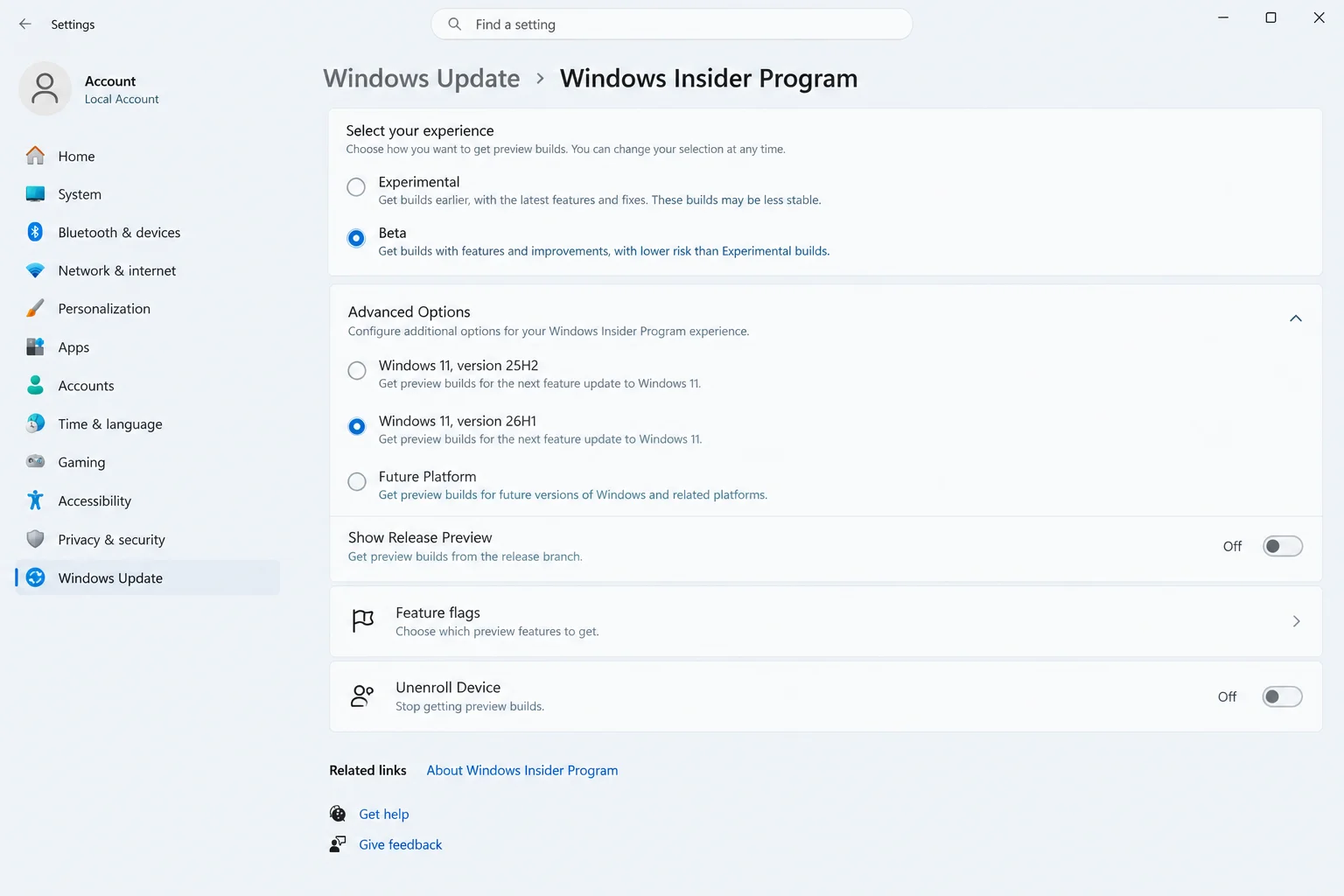
For users unfamiliar with the Windows Insider Program, navigating these updates requires understanding how Microsoft deploys test software. Insider Preview builds deliver work-in-progress features that regular Windows Update mechanisms do not distribute to standard production machines.
Windows 11 Tests Customizable Context Menus, Speed Tests & Privacy Controls

Microsoft organizes testing into distinct channels that receive builds at different stages of readiness. For instance, the speed test is specifically tied to the Experimental channel through a controlled rollout, meaning that installing build 26340.9767 does not guarantee immediate visibility of the feature. Furthermore, build numbers act as version tags identifying exact operating system snapshots, while version labels like 26H1 and 26H2 help map builds to broader release schedules.

What Stable Release Users and IT Support Need to Know

Standard Windows 11 users running public stable builds will experience no changes. None of the preview features are active in standard releases, and regular updates will not enable them unexpectedly. Regular users do not need to patch, pause, or roll back their systems.

For help desk and IT support professionals assisting users who notice unexpected interface elements—such as a modified Start menu or a speed test tile in Quick Settings—the primary step is checking whether the PC is enrolled in the Windows Insider Program. Reviewing Settings > Windows Update will reveal if an active Insider channel is tied to the machine.

Should You Join the Insider Program?

Deciding whether to enroll a PC in preview testing requires careful consideration of the associated risks and realities. Most users should avoid installing Insider builds on primary workstations due to potential instability and Microsoft’s habit of modifying or removing features before general availability.

If you choose to test preview builds, consider the following unenrollment and participation guidelines:

  • Understand channel exit paths: While Beta, Dev, and Release Preview channels allow users to toggle off preview updates to return smoothly to retail builds, the Experimental channel requires a clean operating system installation to leave.
  • Use recovery windows: Settings > System > Recovery > Go back permits reverting to a previous build, but only within a 10-day window or until the next build installs.
  • Protect your data: Always back up files, utilize cloud storage, or test on secondary hardware and virtual machines before enrolling any device.

Ultimately, regular users are best advised to wait for stable releases and rely on existing third-party tools if immediate functionality is required. Among the features currently in preview, the potential arrival of per-app privacy controls for desktop apps represents the most meaningful shift for overall system security and configuration.
Views: 17

Share this:

Related posts:

  • Microsoft Removes Windows 11 PC-to-PC Migration: What to Do Now

  • How to See Signed-In Devices on Your Google Account (and Sign Them Out)

  • Windows 11 Time Wrong or Auto-Sync Failing? How to Fix It

Ethan Carter

Ethan Carter

Ethan Carter is a tech writer focused on Windows optimization, lightweight software, and practical PC troubleshooting. He enjoys testing utilities, improving low-end PC performance, and sharing simple tech solutions that help everyday users get more from their devices.

Next Post
Best USB-C Hubs and Adapters for Mac 2026

Best USB-C Hubs and Adapters for Mac 2026

Leave a Reply Cancel reply

Your email address will not be published. Required fields are marked *

Recommended.

How to Test a CR2032 Battery: A Practical Guide

How to Test a CR2032 Battery: A Practical Guide

October 25, 2026
How to Update Your BIOS (UEFI)

How to Update Your BIOS (UEFI): When You Should, When You Shouldn’t, and How to Do It Safely

October 25, 2026

Trending.

Microsoft PC Manager Review: Surprisingly Useful, But Not the PC Booster You Expect

Microsoft PC Manager Review: Surprisingly Useful, But Not the PC Booster You Expect

June 16, 2026
Is CCleaner Worth It in 2026? Honest Review After Testing It on Modern Windows PCs

Is CCleaner Worth It in 2026? Honest Review After Testing It on Modern Windows PCs

June 17, 2026
7 Best Free Antivirus for Windows 11 Ranked by Performance and Security

7 Best Free Antivirus for Windows 11 Ranked by Performance and Security

June 19, 2026
20 Operating System Examples Categorized by Device and Purpose

20 Operating System Examples Categorized by Device and Purpose

June 27, 2026
12 Best PC Boosters for Gaming, Low-End PCs, and Everyday Performance

12 Best PC Boosters for Gaming, Low-End PCs, and Everyday Performance

June 17, 2026
iPad mini (A20 Pro): Release Date, OLED, Price, and Specifications

iPad mini (A20 Pro): Release Date, OLED, Price, and Specifications

October 29, 2026
What to Expect at Apple’s October 28 Pro and Tell Event

What to Expect at Apple’s October 28 Pro and Tell Event

October 25, 2026
Best Free Screen Recorders for Windows We Tested No Watermarks, No Time Limits

9 Best Free Screen Recorders for Windows We Tested in 2026 (No Watermarks, No Time Limits)

June 23, 2026
Best PC Cleaner for Windows 11: 7 Safe Tools to Clean Junk Files and Free Up Storage

Best PC Cleaner for Windows 11: 7 Safe Tools to Clean Junk Files and Free Up Storage

June 17, 2026
What Is Programming Software? Types, Functions, and Best Tools for Beginners

What Is Programming Software? Types, Functions, and Best Tools for Beginners

June 14, 2026
Internal Hardware of a Computer: Definition, Components, and How Internal Computer Hardware Works

Internal Hardware of a Computer: Definition, Components, and How Internal Computer Hardware Works

March 9, 2026
What Is Utility Software? Functions, 5 Types, Benefits, and Real-World Examples

What Is Utility Software? Functions, 5 Types, Benefits, and Real-World Examples

June 16, 2026
Windows 11 version 26H2 Now Broadly Available for Eligible Devices

Windows 11 version 26H2 Now Broadly Available for Eligible Devices

October 26, 2026
macOS 27 Golden Gate: What’s New, Compatible Macs, and Features

macOS 27 Golden Gate: What’s New, Compatible Macs, and Features

October 29, 2026
New Apple Products Coming in 2026 and 2027: What’s Next for Mac, iPhone, and iPad

New Apple Products Coming in 2026 and 2027: What’s Next for Mac, iPhone, and iPad

October 29, 2026
How Good Is Microsoft Defender Antivirus? Is It Really Enough for Windows 11?

How Good Is Microsoft Defender Antivirus? Is It Really Enough for Windows 11?

May 14, 2026
PowerToys 0.102 Adds Mouse Utilities, Quick Commands, and Dictation

PowerToys 0.102 Adds Mouse Utilities, Quick Commands, and Dictation

October 27, 2026
iPhone Duo Guide: Price, Specifications, Availability, and Reviews

iPhone Duo Guide: Price, Specifications, Availability, and Reviews

October 26, 2026
How to Resize the Windows 11 Start Menu With New Built-In Controls

How to Resize the Windows 11 Start Menu With New Built-In Controls

October 26, 2026
What Is a Device Driver in a Computer? Functions, Types, How It Works, and Examples

What Is a Device Driver in a Computer? Functions, Types, How It Works, and Examples

July 2, 2026
iOS 27 Features, Compatibility, and Siri AI Overview

iOS 27 Features, Compatibility, and Siri AI Overview

October 29, 2026
Apple’s November 2026 Lineup: Hardware Shipping, OS 27.3, and New TV+ Shows

Apple’s November 2026 Lineup: Hardware Shipping, OS 27.3, and New TV+ Shows

November 3, 2026
Best CPU Temperature Monitor Tools for Gaming and Real-Time Tracking

7 Best CPU Temperature Monitor Tools for Gaming and Real-Time Tracking

May 31, 2026
Apple Unveils Thinner, Lighter iPad mini (A20 Pro) with OLED Screen and Major Power Boosts

Apple Unveils Thinner, Lighter iPad mini (A20 Pro) with OLED Screen and Major Power Boosts

October 29, 2026
How to Fix a USB Device That Keeps Disconnecting

How to Fix a USB Device That Keeps Disconnecting

October 26, 2026
Microsoft Tests Controller-Friendly Gaming Task View for Windows 11

Microsoft Tests Controller-Friendly Gaming Task View for Windows 11

October 26, 2026
What Are the Communication Devices? Definition, Key Characteristics, Types, and Real-World Examples

What Are the Communication Devices? Definition, Key Characteristics, Types, and Real-World Examples

June 19, 2026
What Is a Distributed Operating System? Architecture, How It Works, Functions, Benefits, and Examples

What Is a Distributed Operating System? Architecture, How It Works, Functions, Benefits, and Examples

June 27, 2026
OBS Studio Review: Powerful, Free, and Surprisingly Frustrating

OBS Studio Review: Powerful, Free, and Surprisingly Frustrating

June 11, 2026
Why Wrong Wi-Fi Bands Slow Your Devices and How to Fix It

Why Wrong Wi-Fi Bands Slow Your Devices and How to Fix It

October 26, 2026
Intechfy

Intechfy.com is a technology-focused information platform created to make everyday tech concepts easier to understand, more practical, and more accessible.

  • About
  • Contact
  • Disclaimer
  • Sitemap
  • Privacy Policy
  • Terms Of Service

© 2026 Intechfy.com - Information Technology for You

No Result
View All Result
  • Home
  • Guides
  • Utilities
  • Reviews
  • Tech Basics
    • Computer
    • Hardware
    • Software
    • Operating System
    • Networking

© 2026 Intechfy.com - Information Technology for You