• About
  • Contact
  • Disclaimer
  • Sitemap
  • Privacy Policy
  • Terms Of Service
Information Technology for You
  • Home
  • Guides
  • ChromeOS
  • MacOS
  • Windows
  • Utilities
  • Reviews
  • Tech Basics
    • Hardware
    • Software
    • Operating System
    • Networking
No Result
View All Result
  • Home
  • Guides
  • ChromeOS
  • MacOS
  • Windows
  • Utilities
  • Reviews
  • Tech Basics
    • Hardware
    • Software
    • Operating System
    • Networking
No Result
View All Result
Intechfy
No Result
View All Result

When Will My Chromebook Stop Getting Updates? How to Check & What’s Next

Ethan Carter by Ethan Carter
November 3, 2026
Home Windows
Share on FacebookShare on Twitter

A “Final software update” alert on your Chromebook, or a sudden worry about how long your laptop will last, inevitably leads to one crucial question: when will my Chromebook stop getting updates? Every ChromeOS device has a fixed end date for software support. Fortunately, you can check this schedule in under a minute directly through your device settings.

Table of Contents

Toggle
  • Understanding Chromebook Auto Update Expiration (AUE)
  • How to Check Your Chromebook’s Update Schedule
  • What Happens When Your Chromebook Reaches Its AUE Date?
  • What to Do When Your Chromebook Updates Expire
  • Troubleshooting Common Chromebook Update Issues
  • Long-Term Support and the Mid-2034 Horizon

Understanding Chromebook Auto Update Expiration (AUE)

Your Chromebook gets automatic updates until a specific date determined by Google, known as the Auto Update Expiration (AUE) date. Google calculates this support window from the device’s platform release date rather than the day you purchased it.
When Will My Chromebook Stop Getting Updates? How to Check & What's Next

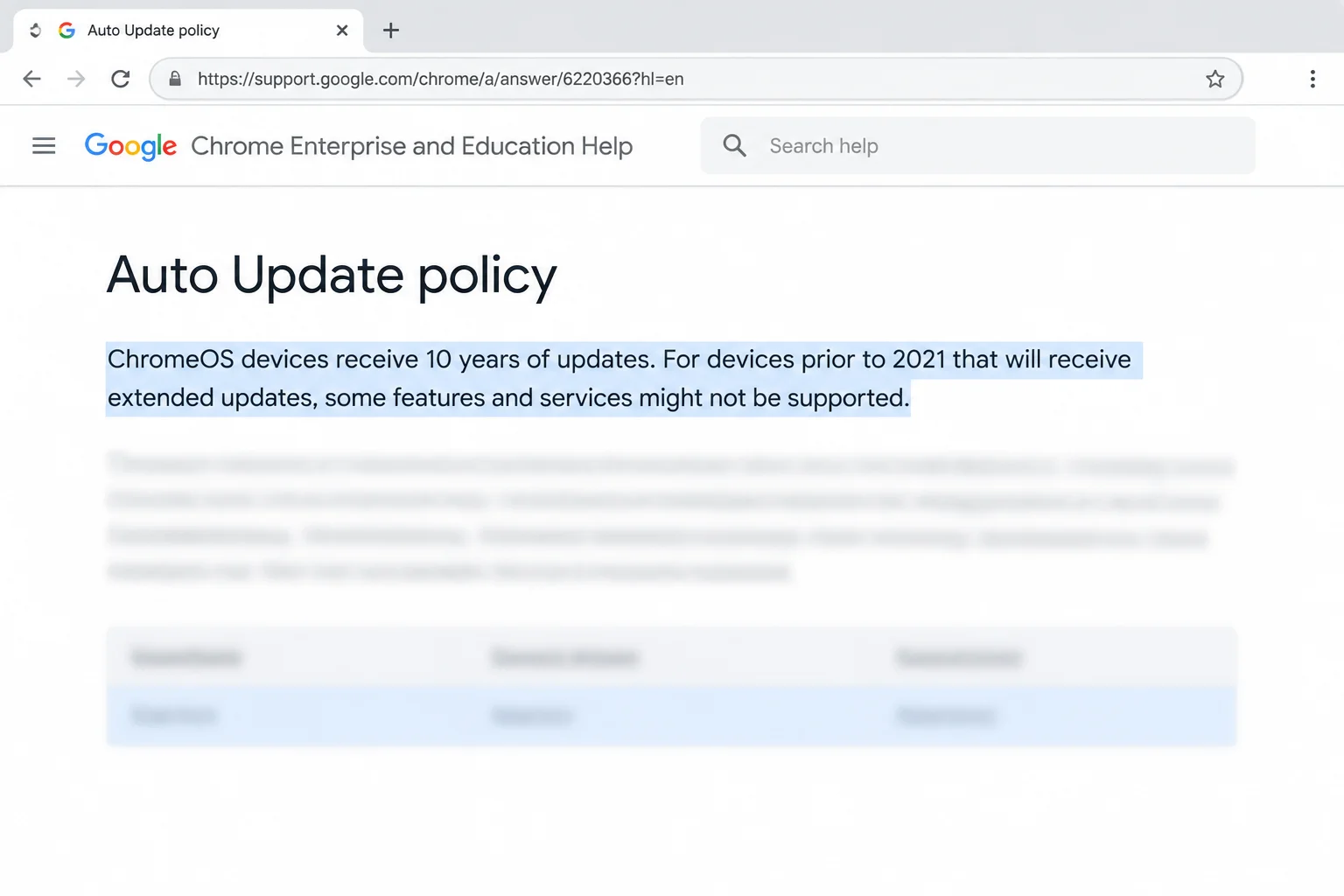
Google’s official policy states that ChromeOS devices receive 10 years of updates. However, because this countdown starts when the platform model is first released, a Chromebook bought on clearance or purchased used may have far fewer than 10 years of support remaining. This is why checking the on-device update schedule is vital before buying secondhand hardware.

It is also important to distinguish support expiration from manufacturing labels. End of Sale is set by the manufacturer to mark when a model stopped being sold as brand new; it has nothing to do with how long the device continues to receive updates. You should always trust the device’s update schedule screen or Google’s official policy page rather than retail clearance labels.
When Will My Chromebook Stop Getting Updates? How to Check & What's Next

How to Check Your Chromebook’s Update Schedule

You can easily find your exact expiration date by following a few simple steps on your personal ChromeOS device:

  1. Select the time in the bottom-right corner of your screen to open the Quick Settings panel, which contains your Wi-Fi, Bluetooth, and volume controls.
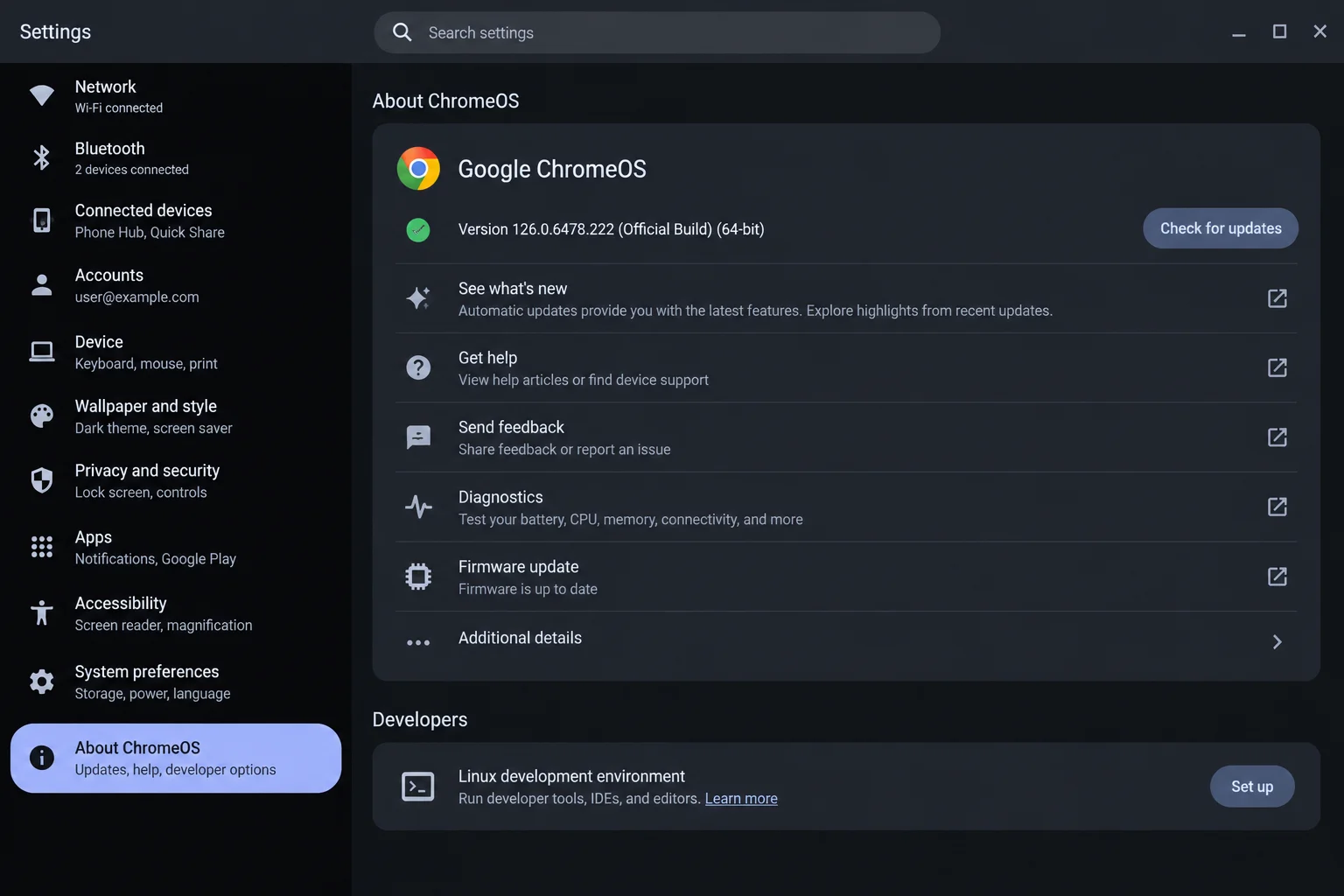
  2. Select the Settings gear icon within the Quick Settings panel, then click on About ChromeOS near the bottom of the left sidebar.
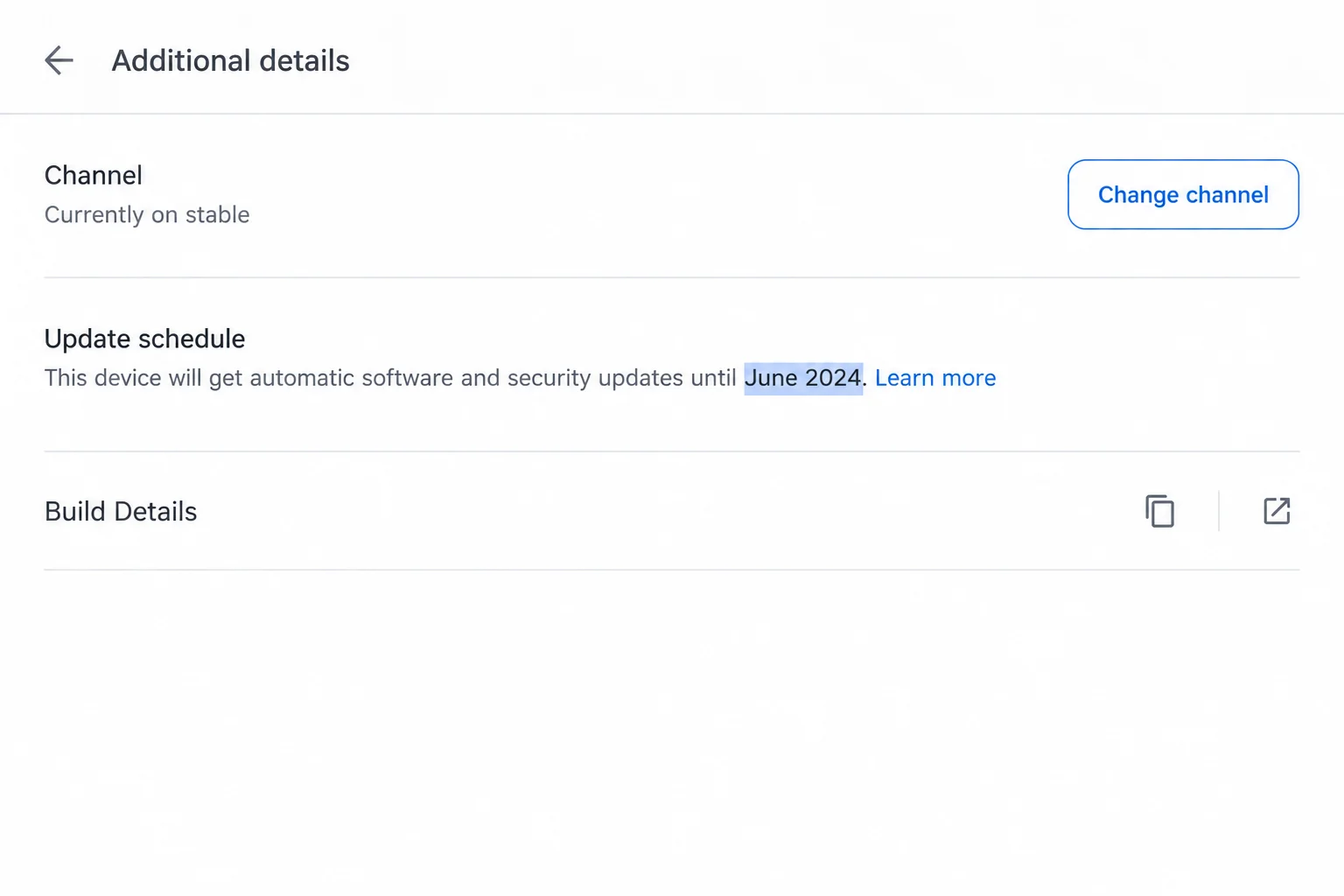
  3. On the About ChromeOS page, select Additional details to view your update schedule date, which typically reads like “This device will get automatic updates until [month year].”
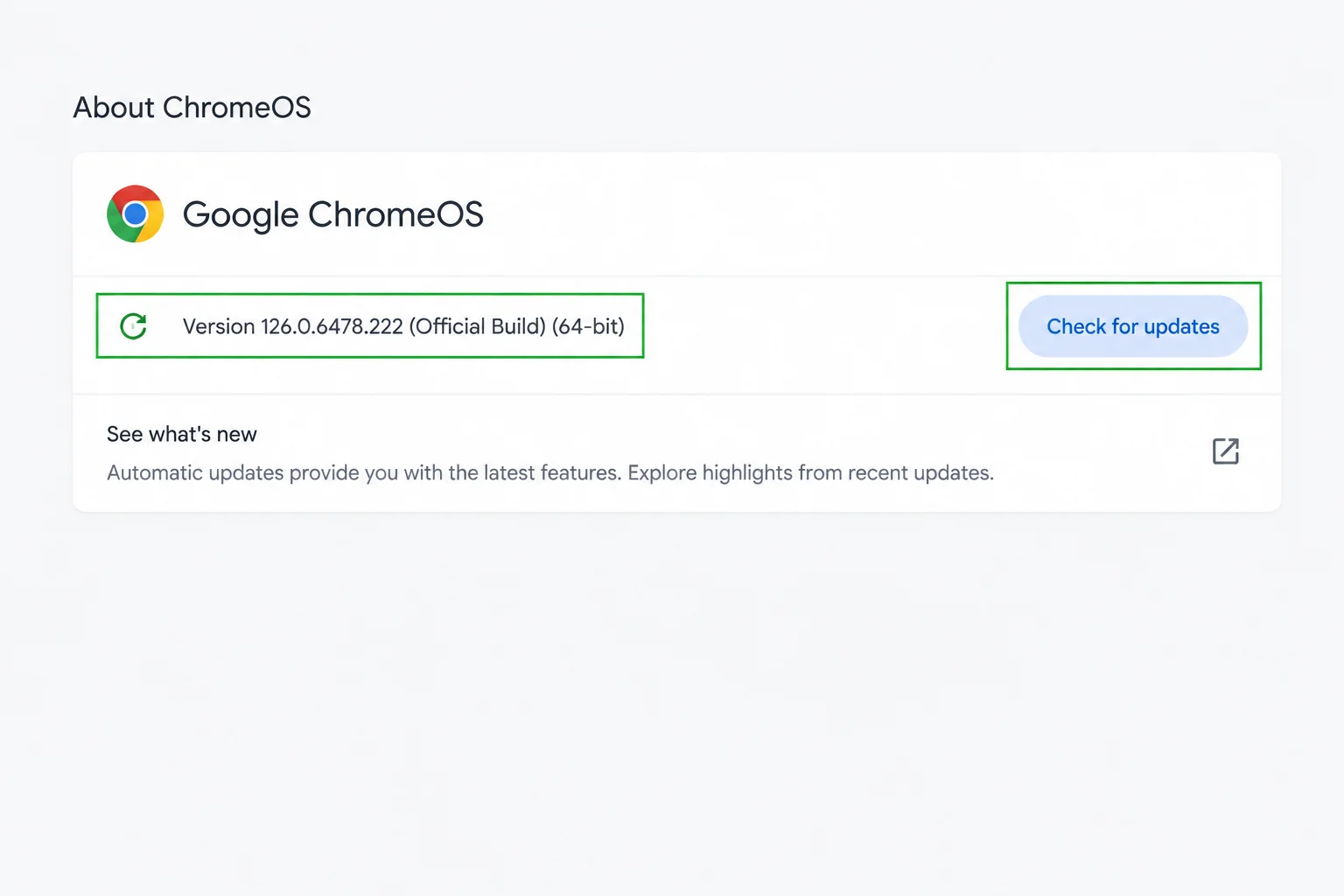
  4. Confirm you are on the latest version by checking for pending updates or selecting restart if an update has already downloaded in the background.

If you see a message stating “Updates are managed by your administrator” instead of a date, your device is managed by an organization such as a school or workplace, and you will need to contact their IT team for support.
When Will My Chromebook Stop Getting Updates? How to Check & What's Next

If you are looking to purchase a used or clearance laptop, you can check model schedules online from any web browser without needing to sign in. Simply review Google’s official Auto Update policy page and match the exact model name and number found on the retail listing or device sticker.

What Happens When Your Chromebook Reaches Its AUE Date?

Once your Chromebook passes its AUE date, support changes immediately. There is no setting available to extend your update window. Understanding what changes helps you decide when it is time to upgrade:
When Will My Chromebook Stop Getting Updates? How to Check & What's Next
  • Chrome Browser Updates: Regular browser updates and critical security fixes stop entirely.
  • App Compatibility: Compatibility with certain web applications, extensions, and websites that require newer ChromeOS or browser versions may eventually drop.
  • General Operation: The Chromebook will still turn on, browse the web, and run previously installed apps, though Google warns that some existing features may stop functioning properly over time.
  • Verified Boot: Verified boot continues to run at every startup, checking the system for tampering and repairing it if corrupted. This core protection does not depend on ongoing updates.

What to Do When Your Chromebook Updates Expire

An expired Chromebook is not completely dead, but you must change how you use it to maintain personal security. Because browser security patches stop, you should immediately move sensitive activities like online banking, school portals, and personal logins away from the expired machine.

To transition smoothly, back up your local files by copying anything stored in Files > My files > Downloads to Google Drive, a USB flash drive, or an external hard drive. Once secured, you can downgrade the device’s job by repurposing it as a kitchen recipe screen or a video player. Plan your hardware replacement before the expiration date arrives, and skip unofficial firmware or developer mode hacks, as they do not restore official Google security patches and introduce new risks.

Troubleshooting Common Chromebook Update Issues

If you encounter unexpected roadblocks while managing your device, review these common scenarios and fixes:

  • “Updates are managed by your administrator”: This happens because your device is enrolled in a school or corporate account. Contact that organization’s IT team for assistance.
  • Update downloaded but version didn’t change: ChromeOS downloads updates automatically in the background, but installation finishes only after a reboot. Select the update notification near the clock and choose Restart.
  • “Final software update” notification appeared: Your device is approaching its AUE date. This is an expected advisory notice rather than an error; confirm your exact date in your settings.
  • Websites telling you your browser is too old: Your device is likely past its update window, and modern websites require a newer browser version. Replacing the hardware is the ultimate solution.

Long-Term Support and the Mid-2034 Horizon

Google has implemented a support cap ensuring ChromeOS devices continue receiving regular updates and security patches through mid-2034. However, this date serves as an absolute end point rather than an extension for older hardware. A device whose scheduled AUE date falls before mid-2034 will still stop getting updates on its original date.

For qualifying newer devices whose 10-year lifecycle would otherwise extend past 2034, Google is committed to supporting transitions toward Googlebook OS with direct migration paths. Until complete migration guidance is released for specific models, your device’s update schedule screen and the official Auto Update policy page remain the most reliable resources for confirming your exact support status.
Views: 21

Share this:

Related posts:

  • Microsoft Removes Windows 11 PC-to-PC Migration: What to Do Now

  • How to See Signed-In Devices on Your Google Account (and Sign Them Out)

  • Windows 11 Time Wrong or Auto-Sync Failing? How to Fix It

Ethan Carter

Ethan Carter

Ethan Carter is a tech writer focused on Windows optimization, lightweight software, and practical PC troubleshooting. He enjoys testing utilities, improving low-end PC performance, and sharing simple tech solutions that help everyday users get more from their devices.

Next Post
Best USB-C Hubs and Adapters for Mac in 2026

Best USB-C Hubs and Adapters for Mac in 2026

Leave a Reply Cancel reply

Your email address will not be published. Required fields are marked *

Recommended.

Operating System Definition in Computer: Functions, Types, and Real Examples Explained

Operating System Definition in Computer: Functions, Types, and Real Examples Explained

June 27, 2026
Microsoft Tests Controller-Friendly Gaming Task View for Windows 11

Microsoft Tests Controller-Friendly Gaming Task View for Windows 11

October 26, 2026

Trending.

Microsoft PC Manager Review: Surprisingly Useful, But Not the PC Booster You Expect

Microsoft PC Manager Review: Surprisingly Useful, But Not the PC Booster You Expect

June 16, 2026
Is CCleaner Worth It in 2026? Honest Review After Testing It on Modern Windows PCs

Is CCleaner Worth It in 2026? Honest Review After Testing It on Modern Windows PCs

June 17, 2026
7 Best Free Antivirus for Windows 11 Ranked by Performance and Security

7 Best Free Antivirus for Windows 11 Ranked by Performance and Security

June 19, 2026
How to Update Your BIOS (UEFI)

How to Update Your BIOS (UEFI): When You Should, When You Shouldn’t, and How to Do It Safely

October 25, 2026
20 Operating System Examples Categorized by Device and Purpose

20 Operating System Examples Categorized by Device and Purpose

June 27, 2026
12 Best PC Boosters for Gaming, Low-End PCs, and Everyday Performance

12 Best PC Boosters for Gaming, Low-End PCs, and Everyday Performance

June 17, 2026
iPad mini (A20 Pro): Release Date, OLED, Price, and Specifications

iPad mini (A20 Pro): Release Date, OLED, Price, and Specifications

October 29, 2026
What to Expect at Apple’s October 28 Pro and Tell Event

What to Expect at Apple’s October 28 Pro and Tell Event

October 25, 2026
Best Free Screen Recorders for Windows We Tested No Watermarks, No Time Limits

9 Best Free Screen Recorders for Windows We Tested in 2026 (No Watermarks, No Time Limits)

June 23, 2026
What Is Programming Software? Types, Functions, and Best Tools for Beginners

What Is Programming Software? Types, Functions, and Best Tools for Beginners

June 14, 2026
Best PC Cleaner for Windows 11: 7 Safe Tools to Clean Junk Files and Free Up Storage

Best PC Cleaner for Windows 11: 7 Safe Tools to Clean Junk Files and Free Up Storage

June 17, 2026
What Is Utility Software? Functions, 5 Types, Benefits, and Real-World Examples

What Is Utility Software? Functions, 5 Types, Benefits, and Real-World Examples

June 16, 2026
Internal Hardware of a Computer: Definition, Components, and How Internal Computer Hardware Works

Internal Hardware of a Computer: Definition, Components, and How Internal Computer Hardware Works

March 9, 2026
Windows 11 version 26H2 Now Broadly Available for Eligible Devices

Windows 11 version 26H2 Now Broadly Available for Eligible Devices

October 26, 2026
macOS 27 Golden Gate: What’s New, Compatible Macs, and Features

macOS 27 Golden Gate: What’s New, Compatible Macs, and Features

October 29, 2026
New Apple Products Coming in 2026 and 2027: What’s Next for Mac, iPhone, and iPad

New Apple Products Coming in 2026 and 2027: What’s Next for Mac, iPhone, and iPad

October 29, 2026
How Good Is Microsoft Defender Antivirus? Is It Really Enough for Windows 11?

How Good Is Microsoft Defender Antivirus? Is It Really Enough for Windows 11?

May 14, 2026
PowerToys 0.102 Adds Mouse Utilities, Quick Commands, and Dictation

PowerToys 0.102 Adds Mouse Utilities, Quick Commands, and Dictation

October 27, 2026
What Is a Device Driver in a Computer? Functions, Types, How It Works, and Examples

What Is a Device Driver in a Computer? Functions, Types, How It Works, and Examples

July 2, 2026
How to Resize the Windows 11 Start Menu With New Built-In Controls

How to Resize the Windows 11 Start Menu With New Built-In Controls

October 26, 2026
iPhone Duo Guide: Price, Specifications, Availability, and Reviews

iPhone Duo Guide: Price, Specifications, Availability, and Reviews

October 26, 2026
iOS 27 Features, Compatibility, and Siri AI Overview

iOS 27 Features, Compatibility, and Siri AI Overview

October 29, 2026
Apple’s November 2026 Lineup: Hardware Shipping, OS 27.3, and New TV+ Shows

Apple’s November 2026 Lineup: Hardware Shipping, OS 27.3, and New TV+ Shows

November 3, 2026
Best CPU Temperature Monitor Tools for Gaming and Real-Time Tracking

7 Best CPU Temperature Monitor Tools for Gaming and Real-Time Tracking

May 31, 2026
What Are the Communication Devices? Definition, Key Characteristics, Types, and Real-World Examples

What Are the Communication Devices? Definition, Key Characteristics, Types, and Real-World Examples

June 19, 2026
How to Fix a USB Device That Keeps Disconnecting

How to Fix a USB Device That Keeps Disconnecting

October 26, 2026
Apple Unveils Thinner, Lighter iPad mini (A20 Pro) with OLED Screen and Major Power Boosts

Apple Unveils Thinner, Lighter iPad mini (A20 Pro) with OLED Screen and Major Power Boosts

October 29, 2026
What Is a Distributed Operating System? Architecture, How It Works, Functions, Benefits, and Examples

What Is a Distributed Operating System? Architecture, How It Works, Functions, Benefits, and Examples

June 27, 2026
What Does MLO Mean on Your Router and Should You Enable It?

What Does MLO Mean on Your Router and Should You Enable It?

October 26, 2026
Windows 11 Start Menu Search Not Working? 9 Ways to Fix It

Windows 11 Start Menu Search Not Working? 9 Ways to Fix It

October 26, 2026
Intechfy

Intechfy.com is a technology-focused information platform created to make everyday tech concepts easier to understand, more practical, and more accessible.

  • About
  • Contact
  • Disclaimer
  • Sitemap
  • Privacy Policy
  • Terms Of Service

© 2026 Intechfy.com - Information Technology for You

No Result
View All Result
  • Home
  • Guides
  • Utilities
  • Reviews
  • Tech Basics
    • Computer
    • Hardware
    • Software
    • Operating System
    • Networking

© 2026 Intechfy.com - Information Technology for You