USB-C and its high-performance Thunderbolt variant have become the universal standard for modern Apple computers. Delivering data transfer speeds up to 80Gbps, fast-charging capabilities up to 240W, and a reversible connector design that eliminates the guesswork of plugging in cables, these ports unlock exceptional capability across MacBooks, iMacs, Mac minis, and Mac Studios. However, because modern Apple laptops and desktops prioritize sleek profiles and streamlined connection arrays, expanding your connectivity options requires the right hardware.
Understanding the distinction between adapters, hubs, and docking stations is essential when outipping your workspace. An adapter typically bridges a single port type, such as converting USB-C to USB-A or Ethernet. A hub provides multiple ports in a portable form factor, while a docking station usually incorporates its own power supply for a comprehensive desktop setup. This guide evaluates the top-tested USB-C hubs, multiport adapters, and specialized docking accessories for Mac users, categorized by performance, workflow requirements, and display needs.
Introduction to USB-C and Thunderbolt Standards for Mac
Modern Macs feature varying tiers of USB-C connectivity, ranging from standard 5Gbps and 10Gbps USB-C ports to advanced Thunderbolt 3, 4, and 5 protocols. Every version of Thunderbolt is fully backwards compatible with standard USB-C, ensuring that the adapters and hubs reviewed here will function with modern Macs—from the MacBook Neo, Air, and Pro to desktop iMac, Mac mini, and Mac Studio systems.
While Thunderbolt ports can achieve blazing transfer speeds between 40Gbps and 80Gbps, standard USB-C speeds of 5Gbps to 10Gbps are more than sufficient for everyday file transfers, external storage access, and peripheral connections. For users requiring ultra-fast workflows, dedicated Thunderbolt or USB4 hubs provide the maximum available bandwidth. Additionally, understanding power delivery (PD) is critical: passthrough charging allows you to power your MacBook while occupying a USB-C port with the hub. While a 60W PD connection can maintain basic operation for a 16-inch MacBook Pro under light loads, higher wattage inputs ensure faster, more reliable charging during intensive processing tasks.
Top-Rated USB-C Hubs and Adapters
Finding the right hub depends on balancing port variety, data speeds, and value. The market features exceptional options ranging from affordable, portable multi-use adapters to ultimate-performance desktop powerhouses.
Plugable 9-in-1 USB-C Hub Multiport Adapter
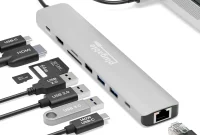
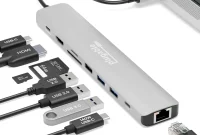
Widely recognized as the best overall USB-C hub, the $49.95 Plugable 9-in-1 Hub (USBC-9IN1E) packs a comprehensive selection of top-tier ports into an affordable package. It features an unrivaled 125W of laptop passthrough power, making it an ideal companion for larger laptops when connected to a high-wattage USB-C charger. It connects via a 7-inch cable at 10Gbps and delivers a total power output of 140W to the laptop and connected devices.
- Pros: 9 ports including Ethernet, 60Hz 4K display via HDMI, 10Gbps USB-C and USB-A, and 125W Power Delivery.
- Port Configuration: 2x USB-C, 3x USB-A, HDMI 2.0, Gigabit Ethernet, UHS-II SD Card Reader, UHS-II MicroSD Card Reader, and laptop charging.
- Display Support: 1x 4K/60Hz via HDMI.
For professional workflows requiring advanced displays, Plugable also offers a 10-port model ($75) with 2.5Gb Ethernet and HDMI 2.1 supporting up to 8K/30Hz or 4K/144Hz, as well as 8-in-1 and 6-in-1 variants tailored to specific display and storage needs.
CalDigit Thunderbolt 5 Element 5 Hub
For users seeking ultimate performance, the CalDigit Thunderbolt 5 Element 5 Hub represents the pinnacle of high-speed connectivity. Harnessing Thunderbolt 5 technology, it delivers up to 80Gbps of data bandwidth and a massive 180W total power distribution.
- Pros: 9 ports including four Thunderbolt 5 ports, five USB ports, 80Gbps data transfer, and 180W total power.
- Cons: Pricier than standard USB-C hubs and may be overkill for basic office workflows.
- Display Support: Up to 4x 6K/60Hz on supported M5 Max configurations; dual 6K or 8K/60Hz on standard dual-display Macs.
Anker 555 8-in-1 USB-C Hub
Offering exceptional value at $49.99, the Anker 555 8-in-1 Hub provides robust performance in a compact, lightweight 4.5oz form factor. It delivers 10Gbps transfer speeds across two USB-C and two USB-A ports, alongside an HDMI port capable of 4K resolution at 60Hz. While its UHS-I SD card readers are limited to 104MBps, the inclusion of Gigabit Ethernet and 85W Power Delivery makes it a versatile travel companion. Users needing native DisplayPort flexibility can step up to the Anker 565 11-in-1 hub.
Satechi OntheGo 7-in-1 Multiport Adapter
The Satechi OntheGo 7-in-1 is an uniquely round, magnetic multiport adapter designed for maximum portability. Weighing just 2.4oz and measuring 2.55 inches across, it features an integrated coiled USB-C cable and a magnetic 3M adhesive ring that allows it to clamp securely to the back of an iPhone 15 or later, or any mobile workspace surface. It provides 10Gbps USB-C data speeds, 80W PD passthrough, HDMI 4K/60Hz output, Gigabit Ethernet, and dual card readers.
Budget and Legacy Connectors: Ugreen and Anker Adapters
For users transitioning older peripherals, specialized adapters bridge the gap:
- Ugreen 4-in-1 USB 3.0 Hub: Provides four full-size 5Gbps USB-A ports for legacy devices, adding a 10W device-charging port in a slim, inexpensive build.
- Anker USB-C to USB-A Adapter: A tiny, simple 2-pack adapter designed to plug a single standard USB-A cable or memory stick directly into a USB-C port.
Best Hubs for Multiple Displays and Dual Screens
Connecting multiple external monitors to a Mac involves navigating Apple’s native hardware limitations. While standard hubs often restrict multiple video ports to Mirrored Mode—where all external screens display the exact same image—advanced hubs utilize high-speed USB4 or DisplayLink software to achieve true Extended Mode.
Native Dual-Display Hubs
For Macs with native multi-display support, specific hubs utilize high-bandwidth connections to drive dual screens without third-party drivers:
- Satechi ExtendView USB4 Dual HDMI Multiport Adapter ($119.99): Uses a 40Gbps USB4 host connection to deliver dual 4K/60Hz displays, two USB-C data ports, two USB-A ports, and 125W passthrough power.
- EZQuest USB 4 Dual Display 8-in-1 Hub ($149.99): Built on Intel’s JHL8140 USB4 chipset, this hub provides plug-and-play support for two 4K displays at 60Hz through three USB4 ports, alongside 77W passthrough charging and five spare 10Gbps data ports.
DisplayLink Solutions for Base-Model Macs
Base-level M1, M2, and M3 Macs as well as the MacBook Neo are historically limited to a single external display. Solutions like the Plugable USB-C Quad 4K HDMI Adapter overcome this restriction by utilizing lightweight DisplayLink software downloads to support up to four 4K external displays in full Extended Mode, accompanied by 100W passthrough charging.
Specialized Hubs for Mac mini, iMac, and Desktop Setups
Desktop Macs benefit from specialized enclosures and stand hubs that improve port accessibility and expand internal storage.
| Accessory Model | Target Desktop Mac | Key Features & Expansion |
|---|---|---|
| Satechi Mac Mini Stand & Hub | Mac mini (M1 through M6 / Pro) | Front-facing USB-A/C ports, SD card reader, and optional NVMe SSD storage enclosure. |
| HyperDrive 6-in-1 Hub for 24-inch iMac | 24-inch iMac | Clamps to the underside of the iMac, offering front-facing 10Gbps ports, 4K/60Hz HDMI, and color-matching faceplates. |
Buying Guide: Choosing the Right Ports and Power for Your Mac
Selecting the ideal accessory requires evaluating your specific workflow requirements across four core categories:
- Display Specifications: Ensure your hub supports the correct resolution and refresh rate. While 4K at 30Hz is adequate for office documents and web browsing, watching video and gaming require a minimum of 4K at 60Hz.
- Card Reader Speeds: Photographers and media professionals should look for UHS-II SD card readers capable of 312MBps transfer speeds, whereas casual users will find UHS-I (104MBps) sufficient.
- Power Delivery (PD): Match your MacBook’s power requirements. Base models like the MacBook Neo operate on 20W to 30W, while 14-inch and 16-inch MacBook Pro models require between 60W and 140W for optimal fast-charging performance. Always pair your hub with a robust 100W USB-C wall charger to maintain stable operation under heavy workloads.
- Legacy Connectivity: Audit your peripheral collection. If you rely on older USB-A thumb drives, wired keyboards, or audio interfaces, select a hybrid hub featuring both USB-C and USB-A ports rather than an all-Type-C model.