USB-C and its Thunderbolt variant represent the most up-to-date standards of the USB connector. They allow data-transfer speeds of up to 80Gbps, can fast-charge devices up to 240W, and conveniently fit in a port either way up, eliminating the age-old USB guessing game of which way the plug goes in. USB-C handles data transfer, video output, and power input simultaneously. Faster variants of USB-C, known as Thunderbolt 3, 4, or 5, are found on modern Macs. Each version of Thunderbolt is backwards compatible with USB-C, meaning the adapters and hubs reviewed here work seamlessly across the Mac lineup, from the MacBooks Neo, Air, and Pro, through to desktop iMac, Mac mini, and Mac Studio models. While USB-C speeds of 5Gbps to 10Gbps limit some of Thunderbolt’s 40Gbps to 80Gbps potential, even 5Gbps remains fast enough for most users. For super-fast data transfers, several dedicated Thunderbolt and 40Gbps USB4 options are available.
Understanding the distinction between port expanders is essential before making a purchase. An adapter typically works with a single port, such as converting USB-C to USB-A or Ethernet. A hub provides multiple ports in a portable form factor, while a docking station usually comes with its own dedicated power supply and extensive desktop connectivity. Apple sells its own range of USB-C adapters for HDMI, VGA, and other connections, but they tend to be overpriced and underpowered compared to the premium alternatives manufactured by trusted third-party brands.
Top-Rated Overall and Value USB-C Hubs
Finding the right balance of port selection, data speed, and pricing requires evaluating top-performing models across different categories, ranging from all-around workhorses to high-speed powerhouses.
Plugable 9-in-1 USB-C Hub (Best Overall)
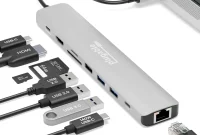
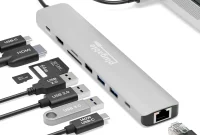
The Plugable 9-in-1 USB-C Hub (USBC-9IN1E) stands out as a top favorite because it packs high-end ports into an affordable package while offering an unrivaled 125W of laptop passthrough power, making it a stellar match for larger laptops. A seven-inch cable connects the hub to your MacBook at 10Gbps data speeds. Total power output from the hub to the laptop and connected devices reaches 140W when paired with a powerful enough USB-C charger. It features a dedicated 10Gbps USB-C data port, an HDMI 2.0 port with 4K 60Hz support, fast UHS-II SD and MicroSD card readers, two 10Gbps USB-A ports (one capable of driving 7.5W to connected devices), and a slower 480Mbps USB 2.0 port suitable for a mouse, keyboard, or memory stick. Plugable also offers a 10-port pro model with 2.5Gb Ethernet and HDMI 2.1 support for up to 8K/30Hz or 4K/144Hz displays, as well as 8-in-1 and 6-in-1 configurations depending on your display, network, and storage needs.
CalDigit Thunderbolt 5 Element 5 Hub (Ultimate Performance)
For users demanding maximum speed and throughput, the CalDigit Thunderbolt 5 Element 5 Hub is the fastest hub available. Measuring 4.5 x 2.75 x 1 inches and weighing 7 ounces, it offers nine ports, including four Thunderbolt 5 ports, two USB-C ports, and three USB-A ports. Thunderbolt 5 delivers up to 80Gbps data transfer. While Thunderbolt 5 requires the most recent top-level Macs, it is fully backwards compatible. The hub supports up to dual 6K or 8K/60Hz extended displays on Macs with dual display support, scaling up to three extended displays on the M5 Pro and four on the M5 Max. It functions as a powerful mini dock, though it carries a higher price tag than standard USB-C hubs.
Anker 555 8-in-1 USB-C Hub (Great Value)
Priced competitively, the Anker 555 8-in-1 USB-C Hub is compact, lightweight at under 4.5 ounces, and packs robust specifications. It features two USB-C ports (one supporting 85W Power Delivery passthrough and another supporting 10Gbps data), two 10Gbps USB-A ports, Gigabit Ethernet, UHS-I SD and MicroSD card readers, and an HDMI port supporting 4K resolution at a smooth 60Hz refresh rate (requiring DP 1.4 support on host devices such as MacBook Air from 2020 onward, MacBook Pro from 2018 onward, and iPad Pro from 2018 onward). Anker also offers an 11-in-1 version (Anker 565) that adds an extra USB-A port, an audio jack, and a native DisplayPort 1.4 connection.
Satechi OntheGo 7-in-1 Multiport Adapter (Best Portable)
Uniquely round and magnetic with a coiled USB-C cable, the Satechi OntheGo 7-in-1 Multiport Adapter packs seven ports into a 2.4-ounce housing. It delivers 10Gbps USB-C speeds, 80W Power Delivery passthrough, 4K/60Hz HDMI video output, Gigabit Ethernet, USB-A ports, and UHS-I card readers. It can clamp magnetically to the back of an iPhone 15 or later, or attach to any surface using the included 3M adhesive ring.
Specialized Solutions: Dual Monitors, Legacy Ports, and Desktop Stands
Depending on whether your workflow requires multi-monitor extensions, legacy USB-A accessories, or clean desktop integration for stationary Macs, specialized hubs and docks provide tailored solutions.
Native Dual-Display and High-Speed USB4 Hubs
Many multi-HDMI hubs on Mac are restricted to mirrored mode. However, hubs utilizing 40Gbps USB4 connections enable true native dual-display support without requiring third-party software installation:
- Satechi ExtendView USB4 Dual HDMI Multiport Adapter: Features 40Gbps USB4 host connection, two dedicated HDMI 2.0 ports supporting dual 4K/60Hz displays, 125W passthrough charging, two 10Gbps USB-C ports, and two 10Gbps USB-A ports.
- EZQuest USB 4 Dual Display 8-in-1 Hub: Built on Intel’s JHL8140 USB4 chipset, this hub provides plug-and-play dual 4K displays at 60Hz across three USB4 ports, along with 77W passthrough charging and five spare 10Gbps data ports.
- Plugable USB-C Quad 4K HDMI Adapter: For users needing up to four extended 4K displays even on entry-level M1 and M2 MacBooks, this adapter utilizes simple DisplayLink software downloads and provides 100W passthrough charging.
- Satechi Pro Hub Slim Adapter: Requires two adjacent Thunderbolt ports on a MacBook, delivering 40Gbps bandwidth via USB4, a 6K/60Hz display connection over USB4, a 4K/60Hz HDMI port, and 96W passthrough charging.
Legacy Connectivity and Dedicated Adapters
For users transitioning away from older equipment, targeted hubs make legacy integration seamless:
- Ugreen 4-in-1 USB 3.0 Hub: Provides four full-size 5Gbps USB-A ports for older memory sticks and printers, paired with a USB-C port supplying a 10W charge for connected devices.
- Anker USB-C to USB-A Adapter: A tiny, simple 2-pack adapter allowing standard USB-A devices to plug directly into a single USB-C port.
- Ugreen USB-C SD 4.0 Card Reader: Features top-speed UHS-II slots for both SD and MicroSD cards with a 220mm cable to prevent port blocking.
- Cable Matters Video Adapters: Simple adapters converting USB-C ports into legacy VGA or DVI displays while maintaining secondary HDMI outputs.
Desktop Stands and Hubs for Mac mini and iMac
Stationary Macs often hide their ports in the back or lack front-facing accessibility. Dedicated desktop accessories solve this cleanly:
Satechi Mac Mini Stand & Hub with SSD Enclosure: Engineered to fit neatly beneath the Mac mini, these stands provide front-facing USB-A ports, card readers, and an integrated NVMe SSD enclosure supporting up to 4TB of affordable hidden storage. Note that M1 and M2 model versions can occasionally impact Wi-Fi signal strength, making wired Ethernet recommended.
HyperDrive 6-in-1 USB-C Hub for 24-inch iMac: Clamps securely to the underside of a 24-inch iMac, providing front-facing 10Gbps USB-C and USB-A ports, SD/MicroSD card readers, and a rear 4K/60Hz HDMI port while matching Apple’s vibrant iMac color options.
Buying Guide: Choosing the Right Hub and Ports for Your Mac
Selecting the ideal hub requires assessing specific hardware requirements across several critical categories:
- Video Capability and Refresh Rates: Ensure the hub supports your monitor resolution. While 4K at 30Hz suffices for basic browsing, watching video and gaming demand a minimum of 4K at 60Hz.
- USB Data Speeds: Look for USB 3.0 or higher, offering 5Gbps to 10Gbps bandwidth, and avoid sluggish USB 2.0 connections capped at 480Mbps.
- Ethernet Speeds: Standard Gigabit Ethernet offers 1000Mbps, while advanced networks support 2.5Gb, 5Gb, or 10Gb Ethernet adapters.
- Card Reader Speeds: Media professionals should verify card reader ratings, choosing UHS-II (312MBps) over slower UHS-I (104MBps) slots.
- Power Delivery Passthrough: Hubs consume some power to operate. Using a 100W wall charger ensures your laptop receives adequate passthrough power (85W or above) to maintain fast charging under load.
Mac Display Modes and Power Requirements Explained
Apple computers feature unique architectural limitations regarding external displays and power delivery that every user should understand.
When connecting multiple external displays to a Mac, standard multi-HDMI hubs typically mirror the primary screen or duplicate identical extended screens due to macOS limitations. To achieve true full Extended Mode—where each external screen displays unique content—users of base-level M1, M2, or M3 MacBooks generally require hubs or adapters supporting DisplayLink software, or specialized hardware utilizing USB4 chipsets like those from Satechi and EZQuest.
Power delivery specifications also vary significantly across the Mac family:
- The MacBook Neo charges efficiently at 20W.
- The 13-inch MacBook Air charges at 30W with fast-charging capabilities at 70W and above.
Standard 13-inch MacBook Pro and 15-inch MacBook Air models require around 45W to 70W.
High-end 14-inch and 16-inch MacBook Pro models require at least 96W for optimal fast charging, with 140W recommended for the largest 16-inch Pro configurations during intensive tasks.