• About
  • Contact
  • Disclaimer
  • Sitemap
  • Privacy Policy
  • Terms Of Service
Information Technology for You
  • Home
  • Guides
  • ChromeOS
  • MacOS
  • Windows
  • Utilities
  • Reviews
  • Tech Basics
    • Hardware
    • Software
    • Operating System
    • Networking
No Result
View All Result
  • Home
  • Guides
  • ChromeOS
  • MacOS
  • Windows
  • Utilities
  • Reviews
  • Tech Basics
    • Hardware
    • Software
    • Operating System
    • Networking
No Result
View All Result
Intechfy
No Result
View All Result

5 nifty ways you can reuse your old laptop

Ethan Carter by Ethan Carter
November 2, 2026
Home Guides
Share on FacebookShare on Twitter

That old laptop of yours might be outdated, but it could still have plenty of life left in it.

An aging computer you no longer use can feel like a burden. Disposing of a machine that still functions feels wasteful, particularly as hardware prices climb due to heavy demands from the artificial intelligence industry. Finding yourself with outdated hardware often leaves you ill-equipped for daily productivity tasks, modern gaming, or heavy entertainment. Despite these limitations, alternative uses exist even if determining the exact application proves challenging.

Even a computer past its prime retains utility in the right context. Five distinct approaches help extract additional value from an aging machine. Breathing new life into a clamshell via a lightweight operating system, transforming it into a media server, or harvesting it for components are just a few methods to inspire creative thinking about a computer’s subsequent phases.

Table of Contents

Toggle
  • Revitalize it with a new operating system
  • Turn it into a home media server
  • Build an air-gapped analysis bench
  • Gift it to a friend or family member
  • Strip it for parts

Revitalize it with a new operating system

A decade-old laptop purchased during college featured an Intel Core i7 processor from 2016, 16GB of RAM, and a 4K display, yet Microsoft deemed it obsolete. The machine lacked eligibility for Windows 11, and Windows 10 failed to operate smoothly.
5 nifty ways you can reuse your old laptop

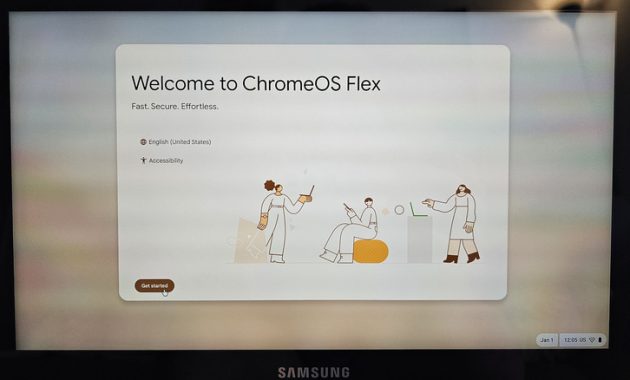
Initial experimentation involved converting the device to ChromeOS Flex, Google’s free operating system version designed for non-Chromebook laptops. Performance remained solid, but the reliance on web apps disrupted established workflows and restricted access to local, open-source applications.

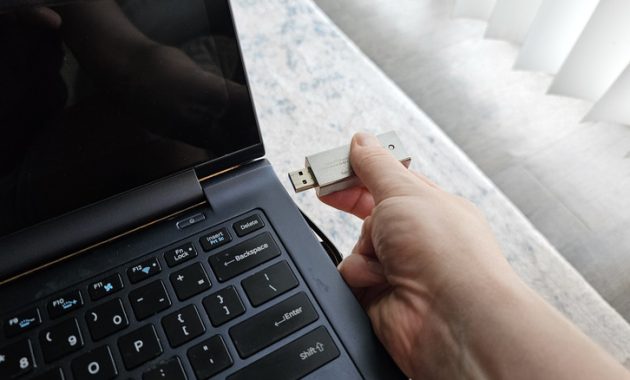
With few alternatives remaining, the installation of Linux proceeded more rapidly than anticipated. Flashing a thumb drive with Fedora Linux, plugging it into the laptop, and booting directly from the drive initiated the GNOME desktop within fifteen minutes.

Linux delivered unexpected speed on the vintage hardware, running multiple applications and numerous browser tabs in Brave before showing any operational strain. Modern Linux distributions offer user-friendly experiences that occasionally surpass Windows in simplicity.

Software installation on Windows frequently requires navigating the internet, avoiding malicious downloads, and executing complex installers burdened with unwanted browser extensions. Conversely, most Linux distributions utilize repositories functioning similarly to application stores, simplifying software management.

5 nifty ways you can reuse your old laptop

Turn it into a home media server

Personal media collections have regained popularity alongside vintage audio formats. Playing localized media across any household device requires configuring a dedicated media server utilizing platforms like Plex, Jellyfin, or Emby.

Although setup demands a few hours of effort, the resulting system enables seamless streaming to all compatible displays, including televisions and smartphones. Locating a suitable computer typically presents the primary barrier, making an old laptop an ideal candidate.

Laptops offer a compact footprint, existing storage capacity, and USB ports for hardware expansion. Furthermore, integrated batteries provide built-in backup power during unexpected outages, while lower energy consumption compared to desktop computers reduces ongoing electricity costs.

Operating a laptop as a media server requires keeping the lid open while disabling the display to ensure proper airflow and minimize thermal load. Additional best practices include setting a 60% battery charge limit and positioning the notebook on a cooling pad.

5 nifty ways you can reuse your old laptop

Standard desktop operating systems support media server software, simplifying the configuration process. Organizing files locally and completing the setup wizard grants network-wide access, though remote streaming requires either paid subscriptions with Plex or manual network configuration for Jellyfin and Emby.

Build an air-gapped analysis bench

Repurposing an unused laptop as an air-gapped analysis bench establishes a digital equivalent of a testing environment. A clean machine devoid of personal information, running a fresh operating system with a local account and no internet access, serves as a secure platform for examining suspicious files.

Configuring the analysis bench involves installing virtualization software such as VirtualBox or VMware to create isolated environments where malicious payloads cause minimal harm. Diagnostic programs like Process Explorer and Wireshark monitor file behavior and network activity to evaluate potential threats.

Disabling antimalware software ensures that tested files execute naturally without interference. This configuration acts as a digital canary for evaluating unknown storage media like thumb drives or reviewing code generated by artificial intelligence tools.
5 nifty ways you can reuse your old laptop

Utilizing a machine for threat analysis carries inherent risks of catastrophic failure or complete data loss. Consequently, this role suits devices that owners feel comfortable wiping repeatedly or discarding entirely.

Gift it to a friend or family member

Hardware abandonment frequently occurs not due to functional failure, but rather from upgrading to more powerful equipment. Transitioning to a laptop with a discrete graphics card often leaves a functional thin-and-light clamshell collecting dust despite handling web browsing and office tasks effectively.

Rehoming a still-useful laptop provides a meaningful upgrade for tech-insensitive acquaintances operating outdated hardware. Formatting the storage drive and installing a fresh operating system prepares the machine for a new user.

Mitigating potential technical support inquiries involves installing ChromeOS Flex to transform the hardware into a Chromebook. The lightweight architecture ensures rapid performance, while reliance on the Chrome browser simplifies navigation.
5 nifty ways you can reuse your old laptop

Google’s security framework minimizes unfamiliar pop-ups and security alerts. When troubleshooting becomes necessary, Chrome Remote Desktop facilitates remote assistance, and the Powerwash feature permits rapid system resets.

Strip it for parts

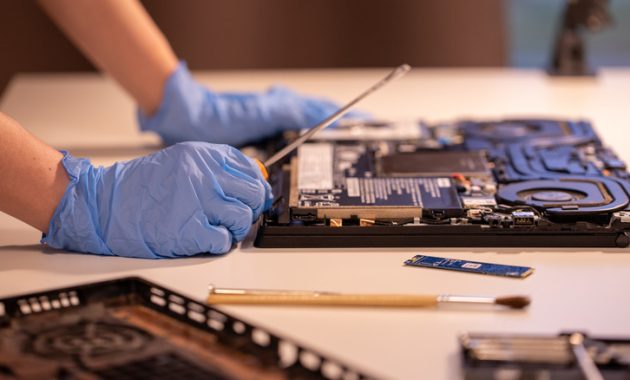
When hardware degradation prevents operating system upgrades or media hosting, salvaging components extracts remaining value. Most modern Windows laptops incorporate removable solid-state drives, while older hard disk drives remain useful if structurally sound.

Certain models feature removable RAM sticks, which retain significant resale value. Wiping extracted drives prior to resale or redeployment protects sensitive data.

Evaluating drive health using diagnostic utilities like CrystalDiskInfo ensures reliability before storing essential files. Healthy internal drives can be installed in other systems or housed in external USB enclosures to expand storage capacity.

Component harvesting leaves behind unusable chassis components requiring responsible disposal. Formatting all un-salvaged storage drives or physically destroying solid-state drives prevents data recovery, after which remaining materials can be delivered to electronics recycling centers or participating retail chains.


Views: 37

Share this:

Related posts:

  • IDScan Offers Free Credit Monitoring After Driver’s License Data Breach

  • Google Search European Union Changes

  • How to Know If a Waterproof USB-C Cable Is Reliable

Ethan Carter

Ethan Carter

Ethan Carter is a tech writer focused on Windows optimization, lightweight software, and practical PC troubleshooting. He enjoys testing utilities, improving low-end PC performance, and sharing simple tech solutions that help everyday users get more from their devices.

Next Post
How to Use the Hidden Windows 11 Menu for Faster Troubleshooting

How to Use the Hidden Windows 11 Menu for Faster Troubleshooting

Leave a Reply Cancel reply

Your email address will not be published. Required fields are marked *

Recommended.

Apple MacBook Pro with PROLED Breaks the Traditional Product Grid

Apple MacBook Pro with PROLED Breaks the Traditional Product Grid

November 2, 2026
Should you buy a MacBook Pro now? M6 and Touchscreen Models Compared

Should you buy a MacBook Pro now? M6 and Touchscreen Models Compared

November 2, 2026

Trending.

Microsoft PC Manager Review: Surprisingly Useful, But Not the PC Booster You Expect

Microsoft PC Manager Review: Surprisingly Useful, But Not the PC Booster You Expect

June 16, 2026
Is CCleaner Worth It in 2026? Honest Review After Testing It on Modern Windows PCs

Is CCleaner Worth It in 2026? Honest Review After Testing It on Modern Windows PCs

June 17, 2026
7 Best Free Antivirus for Windows 11 Ranked by Performance and Security

7 Best Free Antivirus for Windows 11 Ranked by Performance and Security

June 19, 2026
20 Operating System Examples Categorized by Device and Purpose

20 Operating System Examples Categorized by Device and Purpose

June 27, 2026
How to Update Your BIOS (UEFI)

How to Update Your BIOS (UEFI): When You Should, When You Shouldn’t, and How to Do It Safely

October 25, 2026
12 Best PC Boosters for Gaming, Low-End PCs, and Everyday Performance

12 Best PC Boosters for Gaming, Low-End PCs, and Everyday Performance

June 17, 2026
iPad mini (A20 Pro): Release Date, OLED, Price, and Specifications

iPad mini (A20 Pro): Release Date, OLED, Price, and Specifications

October 29, 2026
What to Expect at Apple’s October 28 Pro and Tell Event

What to Expect at Apple’s October 28 Pro and Tell Event

October 25, 2026
Best Free Screen Recorders for Windows We Tested No Watermarks, No Time Limits

9 Best Free Screen Recorders for Windows We Tested in 2026 (No Watermarks, No Time Limits)

June 23, 2026
Best PC Cleaner for Windows 11: 7 Safe Tools to Clean Junk Files and Free Up Storage

Best PC Cleaner for Windows 11: 7 Safe Tools to Clean Junk Files and Free Up Storage

June 17, 2026
What Is Programming Software? Types, Functions, and Best Tools for Beginners

What Is Programming Software? Types, Functions, and Best Tools for Beginners

June 14, 2026
Internal Hardware of a Computer: Definition, Components, and How Internal Computer Hardware Works

Internal Hardware of a Computer: Definition, Components, and How Internal Computer Hardware Works

March 9, 2026
What Is Utility Software? Functions, 5 Types, Benefits, and Real-World Examples

What Is Utility Software? Functions, 5 Types, Benefits, and Real-World Examples

June 16, 2026
Windows 11 version 26H2 Now Broadly Available for Eligible Devices

Windows 11 version 26H2 Now Broadly Available for Eligible Devices

October 26, 2026
macOS 27 Golden Gate: What’s New, Compatible Macs, and Features

macOS 27 Golden Gate: What’s New, Compatible Macs, and Features

October 29, 2026
New Apple Products Coming in 2026 and 2027: What’s Next for Mac, iPhone, and iPad

New Apple Products Coming in 2026 and 2027: What’s Next for Mac, iPhone, and iPad

October 29, 2026
How Good Is Microsoft Defender Antivirus? Is It Really Enough for Windows 11?

How Good Is Microsoft Defender Antivirus? Is It Really Enough for Windows 11?

May 14, 2026
PowerToys 0.102 Adds Mouse Utilities, Quick Commands, and Dictation

PowerToys 0.102 Adds Mouse Utilities, Quick Commands, and Dictation

October 27, 2026
iPhone Duo Guide: Price, Specifications, Availability, and Reviews

iPhone Duo Guide: Price, Specifications, Availability, and Reviews

October 26, 2026
Apple’s November 2026 Lineup: Hardware Shipping, OS 27.3, and New TV+ Shows

Apple’s November 2026 Lineup: Hardware Shipping, OS 27.3, and New TV+ Shows

November 3, 2026
How to Resize the Windows 11 Start Menu With New Built-In Controls

How to Resize the Windows 11 Start Menu With New Built-In Controls

October 26, 2026
What Is a Device Driver in a Computer? Functions, Types, How It Works, and Examples

What Is a Device Driver in a Computer? Functions, Types, How It Works, and Examples

July 2, 2026
iOS 27 Features, Compatibility, and Siri AI Overview

iOS 27 Features, Compatibility, and Siri AI Overview

October 29, 2026
Best CPU Temperature Monitor Tools for Gaming and Real-Time Tracking

7 Best CPU Temperature Monitor Tools for Gaming and Real-Time Tracking

May 31, 2026
Apple Unveils Thinner, Lighter iPad mini (A20 Pro) with OLED Screen and Major Power Boosts

Apple Unveils Thinner, Lighter iPad mini (A20 Pro) with OLED Screen and Major Power Boosts

October 29, 2026
How to Fix a USB Device That Keeps Disconnecting

How to Fix a USB Device That Keeps Disconnecting

October 26, 2026
Microsoft Tests Controller-Friendly Gaming Task View for Windows 11

Microsoft Tests Controller-Friendly Gaming Task View for Windows 11

October 26, 2026
What Are the Communication Devices? Definition, Key Characteristics, Types, and Real-World Examples

What Are the Communication Devices? Definition, Key Characteristics, Types, and Real-World Examples

June 19, 2026
What Is a Distributed Operating System? Architecture, How It Works, Functions, Benefits, and Examples

What Is a Distributed Operating System? Architecture, How It Works, Functions, Benefits, and Examples

June 27, 2026
OBS Studio Review: Powerful, Free, and Surprisingly Frustrating

OBS Studio Review: Powerful, Free, and Surprisingly Frustrating

June 11, 2026
Intechfy

Intechfy.com is a technology-focused information platform created to make everyday tech concepts easier to understand, more practical, and more accessible.

  • About
  • Contact
  • Disclaimer
  • Sitemap
  • Privacy Policy
  • Terms Of Service

© 2026 Intechfy.com - Information Technology for You

No Result
View All Result
  • Home
  • Guides
  • Utilities
  • Reviews
  • Tech Basics
    • Computer
    • Hardware
    • Software
    • Operating System
    • Networking

© 2026 Intechfy.com - Information Technology for You