• About
  • Contact
  • Disclaimer
  • Sitemap
  • Privacy Policy
  • Terms Of Service
Information Technology for You
  • Home
  • Guides
  • ChromeOS
  • MacOS
  • Windows
  • Utilities
  • Reviews
  • Tech Basics
    • Hardware
    • Software
    • Operating System
    • Networking
No Result
View All Result
  • Home
  • Guides
  • ChromeOS
  • MacOS
  • Windows
  • Utilities
  • Reviews
  • Tech Basics
    • Hardware
    • Software
    • Operating System
    • Networking
No Result
View All Result
Intechfy
No Result
View All Result

How to Know If a Waterproof USB-C Cable Is Reliable

Ethan Carter by Ethan Carter
November 2, 2026
Home Guides
Share on FacebookShare on Twitter

When shopping for a waterproof USB-C cable, verifying the official Ingress Protection rating is essential for determining true liquid resistance.

Table of Contents

Toggle
  • Understanding the IEC 60529 Standard
  • Risks Associated with Standard USB-C Connections
  • Materials and Sealing Mechanisms
  • Drying and Inspecting Wet Cables

Understanding the IEC 60529 Standard

Waterproof cables are widely available through online retailers like Amazon and often include protective seals, gaskets, or locking mechanisms. To measure how effectively a connector blocks solids and liquids, the International Electrotechnical Commission established the IEC 60529 standard. This globally accepted Ingress Protection code features two digits, where the first indicates dust resistance and the second signifies water protection.

Genuine waterproof USB-C cables typically carry an IP67 or IP68 rating. Industries operating in harsh outdoor or industrial environments—such as maritime settings, construction sites, manufacturing plants, and electric vehicle charging infrastructure—rely heavily on these protected connections.

How to Know If a Waterproof USB-C Cable Is Reliable

Risks Associated with Standard USB-C Connections

The baseline USB-C standard does not mandate water resistance. While ordinary cables might occasionally survive a minor splash, standard construction offers no performance guarantees during liquid exposure. Inside every standard USB-C connector lie 24 individual contacts managing data and power, which gives it significantly more complexity than older USB-A connections.

Moisture entering the connector interface can trigger a short circuit capable of damaging attached electronics. Prolonged dampness causes metal contacts to corrode over time, while short-circuited wet lines can overheat and present a fire hazard. Operating procedures dictate that users should never plug a wet cable into an active device, regardless of its water-resistance claims.

Materials and Sealing Mechanisms

Manufacturers typically protect USB-C connections by integrating a silicone rubber seal, gasket, or locking collar around the plug housing. Some heavy-duty variants utilize threaded bayonet couplings equipped with a compressible rubber seal that creates a watertight bond as the collar tightens. Applications requiring extended immersion often employ durable synthetic rubber materials like neoprene.
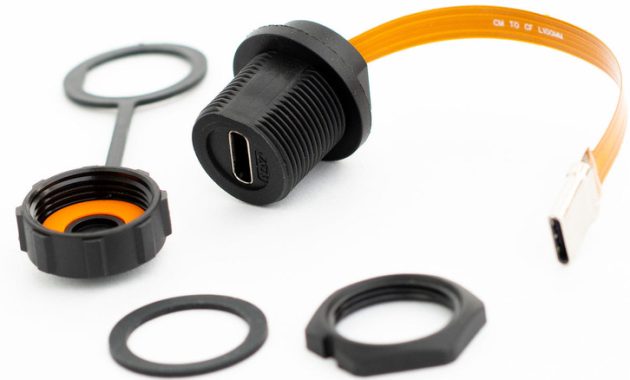
How to Know If a Waterproof USB-C Cable Is Reliable

Environments exposed to harsh chemicals or industrial solvents frequently utilize fluoroelastomer, commonly known as FKM, for superior material resilience. Basic consumer waterproof options generally cost around ten dollars, whereas ultra-rugged industrial alternatives can reach ten times that price point.

Drying and Inspecting Wet Cables

If a cable gets wet but shows no visible contact corrosion, it can usually be reused safely after complete drying. Proper drying requires disconnecting the line, shaking the connector ends to expel trapped liquid, and allowing it to air dry for 24 to 48 hours. Using a hair dryer introduces excessive heat that can ruin the cable, while burying components in rice introduces harmful dust and grit.

Anyone evaluating a waterproof USB-C cable should check for official IP ratings from established brands such as Atlavox, Yale, and industrial-grade L-Com. If a cable becomes unusually hot during use after drying, it must be discarded and replaced immediately.


Views: 35

Share this:

Related posts:

  • IDScan Offers Free Credit Monitoring After Driver’s License Data Breach

  • Google Search European Union Changes

  • How to Use the Hidden Windows 11 Menu for Faster Troubleshooting

Ethan Carter

Ethan Carter

Ethan Carter is a tech writer focused on Windows optimization, lightweight software, and practical PC troubleshooting. He enjoys testing utilities, improving low-end PC performance, and sharing simple tech solutions that help everyday users get more from their devices.

Next Post
Google Search European Union Changes

Google Search European Union Changes

Leave a Reply Cancel reply

Your email address will not be published. Required fields are marked *

Recommended.

macOS 27 Golden Gate: What’s New, Compatible Macs, and Features

macOS 27 Golden Gate: What’s New, Compatible Macs, and Features

October 29, 2026
How to Turn on Developer Options on Firestick: Complete Guide

How to Turn on Developer Options on Firestick: Complete Guide

October 29, 2026

Trending.

Microsoft PC Manager Review: Surprisingly Useful, But Not the PC Booster You Expect

Microsoft PC Manager Review: Surprisingly Useful, But Not the PC Booster You Expect

June 16, 2026
Is CCleaner Worth It in 2026? Honest Review After Testing It on Modern Windows PCs

Is CCleaner Worth It in 2026? Honest Review After Testing It on Modern Windows PCs

June 17, 2026
7 Best Free Antivirus for Windows 11 Ranked by Performance and Security

7 Best Free Antivirus for Windows 11 Ranked by Performance and Security

June 19, 2026
20 Operating System Examples Categorized by Device and Purpose

20 Operating System Examples Categorized by Device and Purpose

June 27, 2026
How to Update Your BIOS (UEFI)

How to Update Your BIOS (UEFI): When You Should, When You Shouldn’t, and How to Do It Safely

October 25, 2026
12 Best PC Boosters for Gaming, Low-End PCs, and Everyday Performance

12 Best PC Boosters for Gaming, Low-End PCs, and Everyday Performance

June 17, 2026
iPad mini (A20 Pro): Release Date, OLED, Price, and Specifications

iPad mini (A20 Pro): Release Date, OLED, Price, and Specifications

October 29, 2026
What to Expect at Apple’s October 28 Pro and Tell Event

What to Expect at Apple’s October 28 Pro and Tell Event

October 25, 2026
Best Free Screen Recorders for Windows We Tested No Watermarks, No Time Limits

9 Best Free Screen Recorders for Windows We Tested in 2026 (No Watermarks, No Time Limits)

June 23, 2026
Best PC Cleaner for Windows 11: 7 Safe Tools to Clean Junk Files and Free Up Storage

Best PC Cleaner for Windows 11: 7 Safe Tools to Clean Junk Files and Free Up Storage

June 17, 2026
What Is Programming Software? Types, Functions, and Best Tools for Beginners

What Is Programming Software? Types, Functions, and Best Tools for Beginners

June 14, 2026
Internal Hardware of a Computer: Definition, Components, and How Internal Computer Hardware Works

Internal Hardware of a Computer: Definition, Components, and How Internal Computer Hardware Works

March 9, 2026
What Is Utility Software? Functions, 5 Types, Benefits, and Real-World Examples

What Is Utility Software? Functions, 5 Types, Benefits, and Real-World Examples

June 16, 2026
Windows 11 version 26H2 Now Broadly Available for Eligible Devices

Windows 11 version 26H2 Now Broadly Available for Eligible Devices

October 26, 2026
New Apple Products Coming in 2026 and 2027: What’s Next for Mac, iPhone, and iPad

New Apple Products Coming in 2026 and 2027: What’s Next for Mac, iPhone, and iPad

October 29, 2026
Apple’s November 2026 Lineup: Hardware Shipping, OS 27.3, and New TV+ Shows

Apple’s November 2026 Lineup: Hardware Shipping, OS 27.3, and New TV+ Shows

November 3, 2026
How Good Is Microsoft Defender Antivirus? Is It Really Enough for Windows 11?

How Good Is Microsoft Defender Antivirus? Is It Really Enough for Windows 11?

May 14, 2026
PowerToys 0.102 Adds Mouse Utilities, Quick Commands, and Dictation

PowerToys 0.102 Adds Mouse Utilities, Quick Commands, and Dictation

October 27, 2026
iPhone Duo Guide: Price, Specifications, Availability, and Reviews

iPhone Duo Guide: Price, Specifications, Availability, and Reviews

October 26, 2026
How to Resize the Windows 11 Start Menu With New Built-In Controls

How to Resize the Windows 11 Start Menu With New Built-In Controls

October 26, 2026
What Is a Device Driver in a Computer? Functions, Types, How It Works, and Examples

What Is a Device Driver in a Computer? Functions, Types, How It Works, and Examples

July 2, 2026
iOS 27 Features, Compatibility, and Siri AI Overview

iOS 27 Features, Compatibility, and Siri AI Overview

October 29, 2026
Best CPU Temperature Monitor Tools for Gaming and Real-Time Tracking

7 Best CPU Temperature Monitor Tools for Gaming and Real-Time Tracking

May 31, 2026
Apple Unveils Thinner, Lighter iPad mini (A20 Pro) with OLED Screen and Major Power Boosts

Apple Unveils Thinner, Lighter iPad mini (A20 Pro) with OLED Screen and Major Power Boosts

October 29, 2026
How to Fix a USB Device That Keeps Disconnecting

How to Fix a USB Device That Keeps Disconnecting

October 26, 2026
Microsoft Tests Controller-Friendly Gaming Task View for Windows 11

Microsoft Tests Controller-Friendly Gaming Task View for Windows 11

October 26, 2026
What Are the Communication Devices? Definition, Key Characteristics, Types, and Real-World Examples

What Are the Communication Devices? Definition, Key Characteristics, Types, and Real-World Examples

June 19, 2026
What Is a Distributed Operating System? Architecture, How It Works, Functions, Benefits, and Examples

What Is a Distributed Operating System? Architecture, How It Works, Functions, Benefits, and Examples

June 27, 2026
OBS Studio Review: Powerful, Free, and Surprisingly Frustrating

OBS Studio Review: Powerful, Free, and Surprisingly Frustrating

June 11, 2026
Why Wrong Wi-Fi Bands Slow Your Devices and How to Fix It

Why Wrong Wi-Fi Bands Slow Your Devices and How to Fix It

October 26, 2026
Intechfy

Intechfy.com is a technology-focused information platform created to make everyday tech concepts easier to understand, more practical, and more accessible.

  • About
  • Contact
  • Disclaimer
  • Sitemap
  • Privacy Policy
  • Terms Of Service

© 2026 Intechfy.com - Information Technology for You

No Result
View All Result
  • Home
  • Guides
  • Utilities
  • Reviews
  • Tech Basics
    • Computer
    • Hardware
    • Software
    • Operating System
    • Networking

© 2026 Intechfy.com - Information Technology for You