Introduction to Android Audio Optimization
Achieving the best sound quality your Android phone can deliver requires more than simply connecting a high-end pair of headphones or in-ears. Digital audio processing is complex, as it involves converting sound waves into code and then translating that code back into sound waves. Understanding the basics of this process allows you to extract superior audio performance from your hardware.
To optimize your listening experience, you must understand how Android routes audio and identify which layers in the system modify the signal. Selecting an app that supports lossless audio and properly equalizing your headphones for either a neutral response or a custom profile are essential steps. Ultimately, these adjustments enable you to decide whether to pursue full, audiophile-grade sound or simply maximize the output of your everyday music streaming app.
Understanding Android’s Audio Signal Chain
Android handles audio through a specific signal chain, meaning music does not instantly transfer from your media app to your ears without interference. The path begins at the audio source, which is the application playing your media, and leads directly into the operating system. Within the OS, a service called AudioFlinger processes the audio and passes it to various layers, including the mixer, where system effects can be applied or audio can duck for notifications.
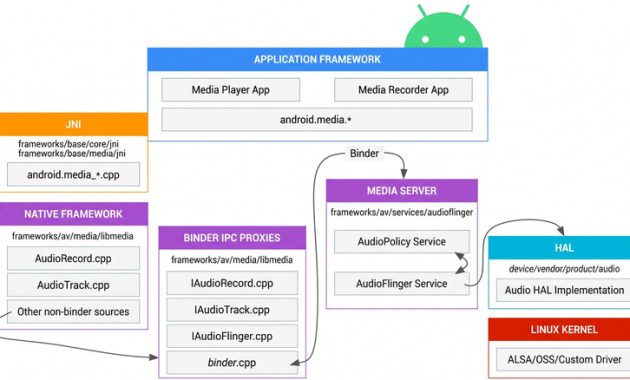
After leaving the mixer, the audio data reaches the interface known as the hardware abstraction layer (HAL). The HAL then transmits the signal to your physical hardware, whether that involves wired headphones, Bluetooth playback devices, or the built-in phone speakers. This routing introduces processing steps that purists often try to avoid when seeking an unaltered sound signal.
Concurrently, AudioFlinger samples and downmixes the audio stream by default using a 32-bit floating point, exceeding the requirements of even true lossless audio files. The system then outputs audio at a 48kHz sample rate with either 16-bit or 24-bit depth. Because consumer lossless audio typically maxes out at 24-bit and human hearing sits below 48kHz, most users find this acceptable. However, this active processing means the Android system constantly adjusts the audio output.
Bit-Perfect Audio and Lossless USB Audio
Achieving mathematical precision in audio, or bit-perfection, means ensuring that the sound passing through the system remains entirely untouched by mixing, resampling, or other alterations along the audio chain. A bit-perfect file is mathematically identical to the source file in your media player. While bit-perfect playback represents the gold standard for audiophiles, it conflicts directly with equalizing your headphones, which intentionally alters the audio signal before it reaches your ears.
Removing preexisting system processing is necessary before applying custom tuning. Android 14 introduced lossless USB audio support, allowing specific apps to address the mixer directly. This feature instructs the system whether to pass audio through the mixer normally or route it straight through the audio framework to the HAL. Successfully implementing this requires every layer of the audio stack to support the function, including the phone manufacturer’s firmware, the player app, and a DAC that natively handles the required sample rate.
Configuring Wired Headphones and DACs
Wired headphones eliminate the need for wireless codecs, making them the most direct route to high-fidelity audio on an Android device. Every bit of the audio signal reaches the drivers without data loss caused by wireless compression, although individual headphone capabilities still dictate sound reproduction. Because modern smartphones rarely feature a 3.5mm headphone jack, users must rely on a digital-to-analog converter, or DAC, to process the audio.
A DAC converts the digital signal transmitted through the phone’s USB-C port into an analog signal that headphone cables can interpret. Using a standalone DAC allows you to select hardware tailored to your preferences rather than relying entirely on internal components. These devices range from portable standalone units to simple USB-C-to-3.5mm adapter dongles.
The capability of the DAC chip performing the audio conversion ultimately determines performance. High-resolution decoding up to 32-bit and 96kHz is ideal. Adapters can be active, handling conversion independently, or passive, utilizing a latent internal DAC inside the phone. Verifying whether your specific Android device features an internal DAC helps determine if a passive adapter will function properly.
While high-end DACs can be expensive, affordable options exist for budget-conscious listeners. The Apple USB-C-to-3.5mm headphone jack dongle serves as a basic, reliable DAC favored by many audio enthusiasts. Alternatively, dedicated portable DACs can be purchased to handle advanced lossless streaming requirements.
Navigating Bluetooth Codecs and Limitations
Bluetooth is frequently criticized by audiophiles because bandwidth constraints traditionally prevent true lossless transmission, forcing a compromise between quality and convenience. However, certain Bluetooth connections deliver audio fidelity that remains indistinguishable from wired setups in normal listening environments.
The standard Bluetooth codec, Sub-band Codec (SBC), is highly lossy and tops out at 320 kbps, comparable to high-quality MP3 files, though it stabilizes further at 192 kbps. Advanced Audio Coding (AAC) is another common codec used across iPhones and many Android devices, capping out at 250 kbps. These codecs satisfy casual listening demands but fall short of high-fidelity standards.
High-resolution Bluetooth codecs, such as Qualcomm’s aptX and Sony’s LDAC, push wireless audio quality significantly higher. Because these codecs are proprietary, both the Android phone and the connected headphones must explicitly support them. Qualcomm’s aptX lineup includes aptX LL, aptX HD, and aptX Adaptive, with the latter featuring an aptX Lossless mode capable of 16-bit depth at 44.1kHz under ideal wireless conditions.
Sony contributed its LDAC codec to the Android Open Source Project (AOSP), ensuring wide compatibility across supported hardware. LDAC supports 32-bit internal processing to match Android’s mixer while capping actual output at 24-bit and 96kHz. Samsung devices also support aptX and LDAC alongside the proprietary Samsung Seamless Codec (SSC), which delivers 24-bit, 96kHz streams to compatible hardware like Galaxy Buds.
Utilizing high-resolution wireless codecs requires compatible headphones. If your device lacks support, performance defaults to standard SBC or AAC streams. Ensuring Android does not override these codecs is equally important, as toggles often reside within dedicated companion apps, standard Bluetooth settings, or developer options where HD audio and preferred sample rates can be manually configured.
Choosing the Right Music Streaming Apps
Your choice of player application remains a critical factor in maximizing Android audio performance. Popular streaming services including Spotify, Apple Music, Tidal, and Qobuz all support lossless audio streams, with ceilings ranging from 24-bit/44.1kHz on Spotify up to 24-bit/192kHz on Tidal and Qobuz.
Achieving true bit-perfect playback requires specialized applications like Tidal or Qobuz connected to third-party players capable of bypassing the Android system mixer. Local music playback requires dedicated local players designed for audiophiles. USB Audio Player Pro and Poweramp stand out as the most robust local player options for Android users.
USB Audio Player Pro and Poweramp both feature dedicated bit-perfect modes that function across Android 13 and earlier versions by utilizing independent processing methods rather than relying on system-level implementations. USB Audio Player Pro includes advanced network streaming features supporting Tidal, Qobuz, Dropbox, UPnP, DLNA, and self-hosted OpenSubsonic servers. Poweramp provides extensive digital signal processing tools and a visualizer for monitoring the audio chain.
Equalizing Your Headphones for Optimal Sound
Digital signal processing encompasses any deliberate alteration made to an audio signal, ranging from equalization to speaker time alignment. Pursuing a purely unaltered signal means avoiding DSP entirely, whereas applying an equalizer modifies the frequency response to match personal listening preferences.
Because consumer headphones rarely feature a perfectly neutral frequency response out of the box, applying targeted DSP to an otherwise bit-perfect stream offers an ideal balance. Listeners generally choose between aiming for a flat, neutral sound profile or a custom tuning that boosts specific frequencies, such as low-end bass.
Building an effective equalization preset can be done manually or by utilizing resources like autoeq.app, which provides frequency response compensation curves for numerous headphone models. These profiles can be exported as text files and imported into applications with parametric equalizers, such as USB Audio Player Pro, or applied globally via background utilities like Wavelet to ensure consistent sound reproduction across all media sources.