USB-C and its Thunderbolt variant represent the most up-to-date standards of the USB connector. They allow data-transfer speeds of up to 80Gbps, can fast-charge devices up to 240W, and conveniently fit into a port either way up. USB-C handles data transfer, video output, and power input simultaneously. You will find faster variants of USB-C, known as Thunderbolt 3, 4, or 5, on modern Macs. Each version of Thunderbolt is backwards compatible with USB-C, meaning the adapters and hubs reviewed here work with modern Macs—from MacBooks Neo, Air, and Pro, through to desktop iMac, Mac mini, and Studio models. While USB-C speeds of 5Gbps to 10Gbps limit some of Thunderbolt’s 40Gbps to 80Gbps potential, 5Gbps is fast enough for most everyday tasks. For super-fast data transfer, several specialized hubs utilize Thunderbolt or 40Gbps USB4.
Understanding the terminology helps when building your setup: an adapter works with a single port such as USB-A or Ethernet, while a hub provides multiple ports. A docking station or dock offers even greater expansion, typically coming with its own power supply, whereas hubs require a separate USB-C charger if you need a power source. Apple sells its own range of USB-C adapters for HDMI, VGA, and more, but they are often overpriced and underpowered compared to the premium alternatives evaluated below. Trusted makers offer higher quality and better feature sets at competitive price points.
Top-Rated USB-C Hubs and Multiport Adapters
Finding the right everyday hub depends on balancing port variety, data speeds, passthrough power, and price. Below are top-tested general-purpose USB-C hubs and adapters for Mac users.
Plugable 9-in-1 USB-C Hub (USBC-9IN1E)
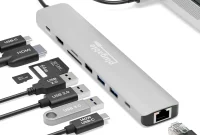
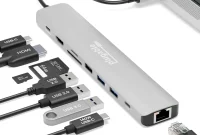
Priced at $49.95, the Plugable 9-in-1 hub is a favorite for offering top-end ports at an affordable price, matched with an unrivaled 125W of laptop passthrough power. Connected via a seven-inch cable, it provides 10Gbps data speeds and a total power output of 140W to the laptop and connected devices. Key specifications include:
- Ports: 2x USB-C, 3x USB-A, HDMI 2.0, Gigabit Ethernet, UHS-II SD Card Reader, UHS-II MicroSD Card Reader, Audio Jack
- Display Support: 1x 4K/60Hz via HDMI
- Passthrough Power: 125W
- USB-C Host Speed: 10Gbps
For professional setups, Plugable also offers the $75 10-port USBC-10IN1E with 2.5Gb Ethernet and HDMI 2.1 supporting up to 8K/30Hz or 4K/144Hz. The $59.99 8-in-1 model (USBC-8IN1E) and $39.99 6-in-1 model (USBC-6IN1) offer alternative configurations depending on your exact display, network, and storage needs.
CalDigit Thunderbolt 5 Element 5 Hub
Representing the ultimate high-end expansion option, the CalDigit Element 5 Hub brings Thunderbolt 5 technology to compatible Macs. Measuring 4.5 x 2.75 x 1 inches and weighing 7 ounces, it functions as a high-performance mini dock.
- Ports: 4x Thunderbolt 5, 2x USB-C, 3x USB-A
- Display Support: Up to 4x 6K/60Hz (M5 Max); 2x 6K/60Hz (M4/M5/M6, M1/M2/M3 Pro/Max)
- Passthrough Power: 90W (180W total power)
- USB-C Host Speed: Up to 80Gbps
While backwards compatible all the way to standard USB-C, its high price point makes it an advanced choice, potentially overkill for basic workflows.
Anker 555 8-in-1 USB-C Hub
At $49.99, the Anker 555 is a compact, great-value hub offering strong performance. It features two USB-C ports (one supporting 85W Power Delivery and another offering 10Gbps data) alongside two 10Gbps USB-A ports. Its HDMI port supports 4K at 60Hz, though devices must support DisplayPort 1.4. It also includes Gigabit Ethernet and UHS-I SD/MicroSD card readers. For users needing more ports, the $69.99 Anker 565 11-in-1 hub adds a DisplayPort 1.4 connection and an audio jack, though its multi-display capabilities on Macs are restricted to mirrored modes.
Satechi OntheGo 7-in-1 Multiport Adapter
Priced at $59.99, the Satechi OntheGo features a round, magnetic design with a coiled USB-C cable. Weighing just 2.4 ounces, it includes an integrated 10Gbps USB-C cable, HDMI supporting 4K/60Hz, Gigabit Ethernet, dual card readers, and dual USB-A ports, delivering up to 80W of passthrough power. It can clamp to the back of an iPhone 15 or later using an included magnetic 3M ring.
Budget and Legacy USB Hubs
For users primarily needing to connect older peripherals, the Ugreen 4-in-1 USB 3.0 Hub adds four 5Gbps USB-A ports at an affordable price point. Alternatively, the Plugable USB-C 2-Port Hub ($16.99) provides two legacy ports, while the Anker USB-C to USB-A adapter comes in a convenient two-pack for single-port conversion needs.
Advanced Display and Multi-Monitor Hubs for Mac
Connecting multiple external displays to a Mac involves navigating Apple’s hardware restrictions. While standard multi-HDMI hubs often default to mirrored displays, specialized hubs use native USB4 bandwidth or DisplayLink software to unlock true extended desktop modes.
Satechi ExtendView USB4 Dual HDMI Multiport Adapter
Priced at $119.99, this hub utilizes a 40Gbps USB4 connection to enable native dual-display support (2x 4K/60Hz) on supported Macs without requiring third-party software installation. It features two dedicated HDMI 2.0 ports, two 10Gbps USB-C data ports, two 10Gbps USB-A ports, and delivers up to 125W of passthrough power when paired with a 140W charger.
EZQuest USB 4 Dual Display 8-in-1 Hub (Pro Series)
Available for $149.99, this hub runs on Intel’s JHL8140 USB4 chipset to provide a plug-and-play dual-monitor setup (two 4K displays at 60Hz or an 8K monitor at 30Hz) without third-party drivers. It includes three USB4 ports (limited to 10Gbps data), four total USB-C ports, and a dedicated power input distributing 77W passthrough power to the host laptop.
Plugable USB-C Quad 4K HDMI Adapter
Utilizing downloadable DisplayLink software, the Plugable USB-C Quad 4K HDMI Adapter (USBC-7400H) supports up to four independent 4K external displays in full extended mode, even on base-level M1 and M2 MacBooks that are otherwise restricted to a single external monitor. It also includes 100W passthrough charging. The smaller Plugable USB-C Dual HDMI Adapter ($119.95) offers a similar two-port display solution without passthrough charging.
Satechi Pro Hub Slim and Plugable 5-in-1 Hub
The $79.99 Satechi Pro Hub Slim requires two adjacent USB-C ports on a MacBook, delivering 40Gbps bandwidth via USB4 to drive a 6K/60Hz display alongside a 4K/60Hz HDMI monitor. Similarly, the Plugable 5-in-1 USB-C Hub (AMS-5IN1E) uses a flush dual-port connection to offer 40Gbps data transfer, 6K display support via USB-C, Gigabit Ethernet, and dual USB-A ports while preserving access to MagSafe charging.
Specialized Desktop Hubs, Stands, and Single-Port Adapters
Desktop users and professionals requiring specific network speeds, storage expansions, or charging stations can utilize specialized form factors.
Satechi USB-C Multiport Adapter 8K With Ethernet V3
Priced at $99.99, this adapter features five USB-C ports (three at 10Gbps), HDMI 2.1, Gigabit Ethernet, and a fast UHS-II SD card reader. It supports up to 85W passthrough power but omits USB-A ports entirely, making it ideal for all-USB-C workflows.
EZQuest USB-C Slim Gen 2 Hub Adapter 6-in-1
Featuring six USB-C ports (four rated at 10Gbps data, one for 4K/60Hz video output, and one for 100W power input delivering 80W passthrough), this $79 hub is built for users prioritizing high-speed USB-C connectivity.
Desktop Stands and Enclosures for Mac mini and iMac
For Mac mini and iMac owners, specialized stands integrate ports into accessible locations while adding storage flexibility:
- Satechi Mac Mini M6/M5 Pro/M4 Stand & Hub with SSD Enclosure ($99.99): Adds three front-facing USB-A ports, an SD card reader, and an internal NVMe SSD enclosure supporting up to 4TB of hidden storage.
- HyperDrive 6-in-1 USB-C Hub for 24-inch iMac: Clamps to the underside of the 24-inch iMac, color-matching the chassis while bringing two 10Gbps USB-C ports, a 10Gbps USB-A port with 7.5W charging, card readers, and an HDMI 4K/60Hz port to the front.
Networking and Video Adapters
For singular connectivity upgrades, options like the Plugable USB-C to 2.5Gb Ethernet Adapter and Ugreen USB-C SD 4.0 Card Reader provide high-speed networking and media transfers. Legacy video needs are met via adapters like the Cable Matters USB-C to VGA and DVI adapters, while the Apple Thunderbolt 3 to Thunderbolt 2 adapter bridges older hardware generations.
Buying Guide: Choosing the Right Ports and Power for Your Mac
Selecting the ideal hub requires evaluating your specific connectivity requirements, display goals, and hardware limitations.
Essential Port Considerations
Assess which peripherals you use daily. External displays require checking whether a hub supports HD, 4K, or 8K resolutions, alongside refresh rates of 60Hz or higher for smooth gaming and video playback. Legacy USB-A ports remain useful for older flash drives, while UHS-II card readers offer faster media transfers than UHS-I slots. For internet stability, Ethernet ports range from standard 1Gb up to 2.5Gb and 5Gb networking.
Mac Display Modes: Mirrored vs. Extended
Most multi-HDMI hubs mirror your Mac screen or restrict extended setups unless powered by native USB4/Thunderbolt controllers or DisplayLink drivers. Base-level M1, M2, and MacBook Neo models require software solutions like DisplayLink or InstantView to drive multiple independent external monitors.
Onboard Port Reference Across Mac Models
| Mac Model | Native Onboard Ports |
|---|---|
| MacBook Neo | 2x USB-C (1x 10Gbps data, 1x charging), 3.5mm headphone jack |
| MacBook Air | 2x Thunderbolt 4, MagSafe 3, 3.5mm headphone jack |
| MacBook Pro (M4/M5/M6) | 3x Thunderbolt 4/5, MagSafe 3, HDMI, SDXC Card Reader, 3.5mm jack |
| Mac mini (M4/M5 Pro) | 3x Thunderbolt 4/5, 2x USB-C (10Gbps), HDMI, Ethernet, 3.5mm jack |
| iMac (24-inch) | 2x or 4x Thunderbolt 4/USB4, 3.5mm headphone jack, optional Ethernet |
MacBook Power Delivery Requirements
Power Delivery (PD) specifications dictate how quickly your laptop charges through a hub:
- MacBook Neo: Charges at 20W.
- 13-inch MacBook Air: Charges at 30W, fast-charges at 70W+.
- 14-inch MacBook Pro: Requires at least 60W (96W+ recommended for fast charging).
- 16-inch MacBook Pro: Prefers 140W, though functional at 94W under normal workloads.
Using a lower-power charger slows charging speeds under heavy system loads, whereas higher-power chargers safely supply only the wattage required by the device.