
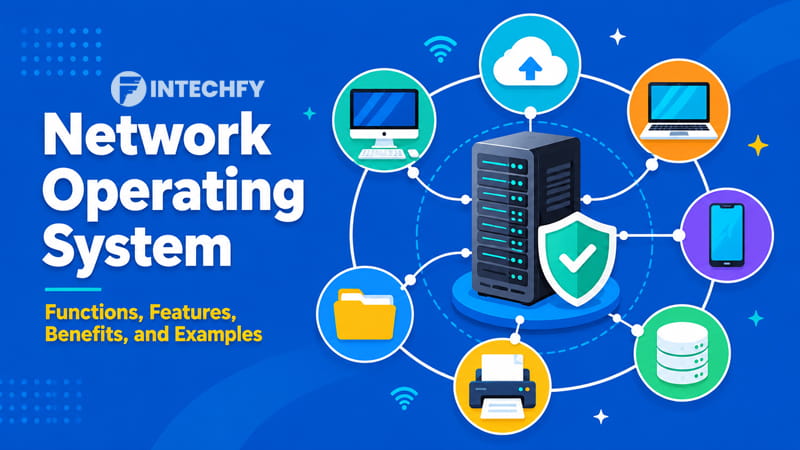
A small office may start with only a few computers connected to the same internet connection. Employees save files on local machines, print documents from a shared printer, and log in using separate accounts. At that size, daily management feels straightforward. The situation changes once new devices, additional staff, shared folders, and centralized data storage enter the picture. At that point, a network operating system becomes part of the foundation that keeps everything organized.
Picture a company with dozens of workstations spread across multiple departments. Staff members need access to shared documents, printers, applications, and internal resources. Granting permissions manually on every machine would consume a significant amount of time. A centralized approach allows administrators to control access, maintain consistency, and reduce repetitive tasks.
Growth often brings new challenges. User accounts must be managed, files must remain accessible, and connected devices must communicate without creating confusion. Security requirements also increase as more people and endpoints join the environment. A mistake on one machine can affect resources used by others.
This is where network operating systems become valuable. They provide a structured way to manage users, devices, and shared resources from a central location. Through networking in operating system environments, organizations can maintain control over resources while supporting day-to-day operations.
Rather than treating every computer as an isolated system, an operating system for network environments allows connected devices to function within a coordinated framework.
What Is a Network Operating System?
Managing computers one by one may work in a small setup, but the approach becomes difficult once users need continuous access to shared files, printers, applications, and network resources. Connected environments require a system that can coordinate communication, enforce policies, and maintain consistency across devices.
Network Operating System Definition
A network operating system is software designed to manage and coordinate resources across connected computers and devices. Instead of focusing on a single machine, it oversees interactions between users, servers, workstations, storage systems, and shared services operating within the same network environment.
When people ask what is network operating system, the simplest answer is that it provides centralized control over network resources and user access. It creates a framework that allows devices to communicate, exchange data, and use shared services under established policies.
A personal computer operating system primarily manages local hardware and software. A networked operating system extends management beyond one device by handling authentication, permissions, resource allocation, and communication between multiple systems.
Another common question is what is the network operating system used for in business environments. The answer often centers on administration. Instead of configuring every workstation separately, administrators can manage settings, permissions, and access controls from a central point. This approach reduces inconsistency while improving operational efficiency throughout the network.
Why Organizations Use Network Operating Systems
Organizations depend on a network operating system because employees frequently access shared resources throughout the workday. Documents, applications, printers, databases, and storage systems are easier to manage when access rules are controlled from a central location.
User management is another reason businesses deploy these platforms. New employees can receive credentials, permissions can be adjusted, and access can be revoked without visiting every device individually.
Security policies also become easier to enforce. A properly configured network in operating system environments allows administrators to apply authentication requirements, access restrictions, and monitoring policies consistently across connected systems.
Administrative workloads remain manageable even as the number of users and devices continues to grow.
How a Network Operating System Works
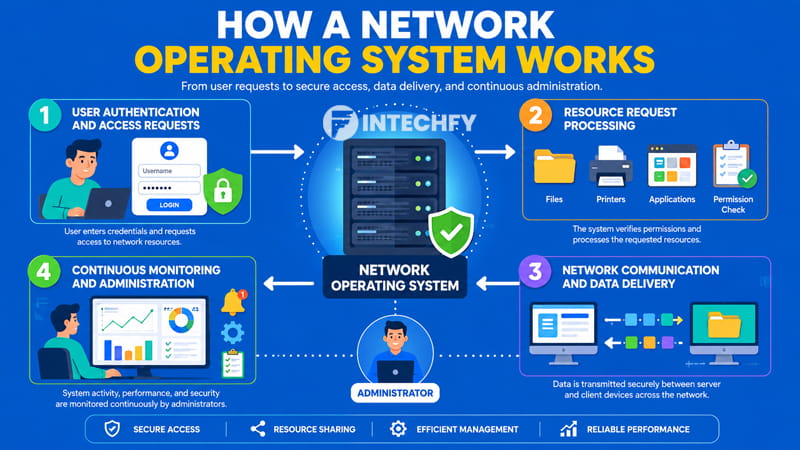
A connected environment depends on communication between users, devices, servers, and shared resources. Every request follows a structured process that determines who can access resources, where information is located, and how data moves through the network.
User Authentication and Access Requests
The process usually begins when a user signs in. Credentials such as usernames and passwords are submitted to a server responsible for identity verification. The system checks whether the supplied information matches stored account records.
Once validation is complete, the network operating system determines which resources the user can access. Permissions assigned to individual accounts or groups influence the outcome of this decision.
Authentication serves as the first checkpoint within the environment. Without successful verification, access to files, printers, applications, and other network services remains restricted. This process prevents unauthorized users from reaching protected resources while allowing approved personnel to proceed with their work.
Resource Request Processing
After authentication, users begin requesting resources. A document stored on a file server, a shared printer, or a business application may all require approval before access is granted.
The network operating system evaluates each request against permission settings associated with the account. If authorization exists, the system identifies the resource location and prepares access instructions.
Consider a shared folder used by an accounting department. Employees assigned to that department may receive read and write permissions, while other staff members receive limited access or no access at all. The same principle applies to printers, storage locations, and software services distributed throughout the network.
Network Communication and Data Delivery
Once a request receives approval, data transmission begins. Information travels between servers and client devices through established communication protocols.
Within a client server network, servers store resources and process requests while client devices initiate access. The network operating system coordinates these exchanges to maintain reliable communication.
A server based network also relies on resource availability. If a user opens a shared document, the system retrieves the requested file and delivers it across the network connection. Similar processes occur when users launch applications or retrieve stored information from centralized locations.
Continuous Monitoring and Administration
Network activity continues long after users access resources. The network operating system records events, tracks performance metrics, and supports ongoing network administration tasks.
Administrators review usage patterns, identify unusual behavior, and maintain system stability through centralized network management practices. Continuous oversight supports reliable operations while reducing disruptions across connected devices.
The relationship between networking and operating system functions remains active throughout the entire lifecycle of the network environment.
Core Functions of a Network Operating System
Daily activity inside a connected environment depends on a set of processes that keep resources available, user access organized, and administrative tasks manageable. A network operating system coordinates these activities from a central point, allowing connected devices to work within the same framework rather than functioning as isolated systems.
This structure supports resource availability, account control, security policies, and ongoing maintenance across the network.
Resource Sharing
One of the primary functions of a network operating system is making shared resources available to authorized users. Instead of storing every file on individual computers, organizations often place documents in centralized locations that can be accessed through the network.
The same approach applies to storage systems, business applications, and printers. Employees can retrieve documents from shared folders, launch software hosted on servers, and send print jobs without maintaining separate copies of resources on every machine.
Effective network resource sharing reduces duplication, simplifies updates, and keeps information accessible from multiple endpoints. A properly configured environment also maintains consistent access rules across departments and workgroups.
User and Account Management
A growing network quickly becomes difficult to manage without a structured method for handling accounts. A network operating system allows administrators to create users, assign permissions, and organize individuals into groups based on job responsibilities.
Departments such as finance, sales, and human resources often require different levels of access. Group-based administration makes it possible to apply permissions across entire teams rather than modifying settings for each employee separately.
Account management also supports onboarding and offboarding processes. New users can receive credentials through centralized administration, while inactive accounts can be disabled when employment or project access ends. This approach keeps administrative workloads under control as the environment expands.
Security Enforcement
Security policies depend on consistent enforcement throughout the network. A network operating system provides mechanisms that regulate who can enter the environment and which resources become available after login.
The process begins with user authentication, where submitted credentials are checked against stored account records. Once identity verification is completed, authorization rules determine which files, applications, or services can be accessed.
Permission structures form the foundation of access control. Employees receive access based on business requirements rather than unrestricted visibility across all resources. Combined with policy enforcement and auditing capabilities, these controls strengthen network security management and reduce exposure to unauthorized activity.
Network Monitoring and Maintenance
Networks generate continuous activity. User logins, file transfers, printer requests, storage usage, and application traffic all contribute to operational workloads.
A network operating system tracks these events and provides administrators with visibility into system performance. Monitoring tools can reveal abnormal behavior, resource bottlenecks, and connectivity issues before they affect larger portions of the environment.
Maintenance tasks such as software updates, configuration adjustments, and system checks can also be coordinated from central management platforms. Regular oversight supports stability and reduces disruptions across connected devices.
Key Features of a Network Operating System
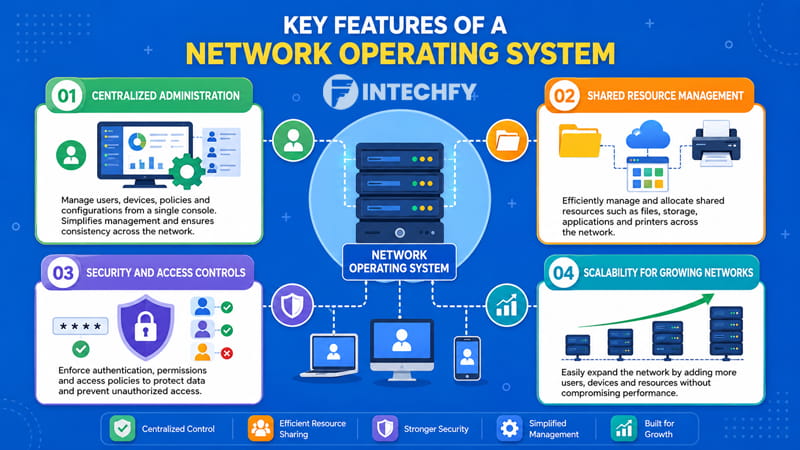
The capabilities built into a network operating system influence how users, devices, and services interact throughout a connected environment. These features create consistency across daily operations while reducing the complexity associated with managing large numbers of endpoints.
Centralized Administration
Administrative efficiency improves when critical controls are available from a single management location. A network operating system allows administrators to configure policies, manage accounts, and oversee resources without moving from one device to another.
This centralized model reduces repetitive work and creates a more consistent operating environment. Changes applied through administrative consoles can reach multiple systems without requiring manual configuration on every workstation.
Shared Resource Management
Resources distributed across a network require coordination to remain accessible and organized. A network operating system manages file locations, storage allocation, printer availability, and application access from centralized controls.
Consistent allocation policies prevent conflicts while maintaining predictable access for authorized users. This structure also reduces confusion when multiple employees rely on the same resources during daily operations.
Security and Access Controls
Permission management is a defining characteristic of modern network operating systems. Administrative policies determine which users can view, modify, create, or delete resources within the environment.
Access restrictions can be assigned to individuals, departments, or entire groups. Combined with authentication systems, these controls establish clear boundaries between users while maintaining operational flexibility.
Scalability for Growing Networks
Network requirements often change over time. A small business may begin with only a handful of devices before expanding into a much larger environment.
A network operating system supports this growth by accommodating additional users, workstations, printers, servers, and services without requiring a complete redesign. Expansion can occur gradually while maintaining centralized oversight.
Growth from a small office to an enterprise environment often depends on the same core architecture. This adaptability explains why network operating systems remain common across organizations of different sizes.
Common Features of a Network Operating System
| Feature | Purpose |
|---|---|
| User Authentication | Verify user identity |
| Access Control | Restrict unauthorized access |
| File Sharing | Allow resource sharing |
| Device Management | Manage connected devices |
| Centralized Administration | Simplify network management |
| Monitoring Tools | Track network performance |
Features such as these shape everyday networking in operating system environments. Whether deployed as a dedicated network platform or as part of a server os, centralized management remains a defining characteristic.
Benefits of Using a Network Operating System
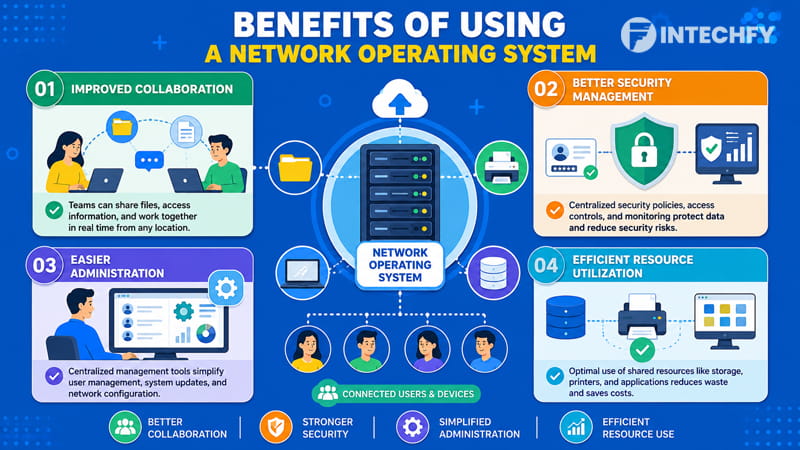
Organizations often choose centralized management models because consistency becomes easier to maintain when users, devices, and resources operate under the same administrative framework.
According to data from Precedence Research, the global server operating system market was valued at approximately USD 24.19 billion in 2025 and is projected to reach USD 54.26 billion by 2035. The report also forecasts an annual growth rate of 8.41%, reflecting demand for centralized administration, security controls, and enterprise infrastructure.
Improved Collaboration
Shared folders, centralized storage, and common applications allow employees to work with the same information regardless of location. A network operating system reduces dependency on local files and supports coordinated access across departments.
Better Security Management
Security policies remain easier to enforce when user accounts, permissions, and authentication settings are controlled from one environment. Stronger network management practices reduce inconsistent configurations and unauthorized access.
Easier Administration
Administrative tasks such as account creation, permission updates, and resource allocation can be completed from centralized management tools. This structure reduces manual effort and simplifies oversight of connected systems.
Efficient Resource Utilization
A single operating system for network environments can manage shared storage, printers, applications, and infrastructure resources more efficiently than isolated systems. Centralized allocation reduces duplication while improving utilization across the organization.
Examples of Network Operating Systems
Every organization operates under different technical requirements. A small office may prioritize straightforward administration, while a large enterprise often focuses on security policies, directory services, storage management, and centralized control.
Because of these differences, the software chosen to support connected devices can vary significantly. A network operating system is available in multiple forms, ranging from server platforms used inside corporate data centers to software designed specifically for network infrastructure hardware.
Windows Server
Among enterprise platforms, Windows Server remains one of the most recognizable examples of a network operating system. Businesses, educational institutions, healthcare providers, and government agencies frequently deploy it as the foundation of their network environment.
One reason for its popularity is the integration of Active Directory, a directory service that manages users, groups, computers, and security policies from a centralized location. Administrators can control access permissions, enforce password requirements, and organize devices through domain-based management.
Domain services also simplify administration. Instead of configuring each workstation individually, policies can be distributed across connected devices from a central console.
A market analysis by Precedence Research found that Windows server operating systems accounted for roughly 58% of the global server OS market in 2025. This level of adoption reflects how widely organizations rely on Windows Server for file sharing, user authentication, Active Directory administration, and network administration.
The platform is often referred to as a Windows Server operating system, a Windows Server OS, or simply enterprise Microsoft server software, depending on the environment and deployment model.
Linux Server
A Linux server is another widely deployed example of a network operating system. Organizations often choose Linux because of its flexibility, stability, and extensive open-source ecosystem.
System administrators can customize configurations to meet specific operational requirements without being restricted to a single vendor’s development roadmap. This adaptability makes Linux attractive for web hosting, cloud infrastructure, database management, and enterprise applications.
Popular distributions such as Ubuntu Server, Red Hat Enterprise Linux, and Rocky Linux provide enterprise-grade functionality while supporting centralized administration, security controls, and network resource management.
Large technology companies, financial institutions, telecommunications providers, and cloud platforms frequently rely on Linux-based environments to support critical workloads across thousands of devices.
UNIX-Based Systems
The UNIX operating system family predates many modern server platforms and remains respected for stability and reliability. Although newer technologies dominate current deployments, UNIX continues to operate within industries that depend on long-established infrastructure.
Banking institutions, manufacturing facilities, research organizations, and telecommunications providers have historically used UNIX-based platforms for mission-critical operations. Administrators often value predictable performance and mature management capabilities.
Products such as IBM AIX, HP-UX, and Oracle Solaris demonstrate how UNIX continues to maintain a presence within enterprise computing environments that prioritize long-term operational consistency.
Cisco IOS
While server platforms receive most of the attention, networking hardware also relies on specialized operating systems. Cisco IOS is one of the most widely recognized examples.
Routers and switches running Cisco IOS manage packet forwarding, routing protocols, security configurations, and device communication. Administrators use the platform to configure infrastructure components that support connectivity across local and wide-area networks.
Novell NetWare
Before modern enterprise platforms became dominant, Novell NetWare was a prominent network operating system used in business environments.
During the early growth of local area networks, NetWare gained recognition for file sharing, printer sharing, and centralized administration capabilities. Although its popularity declined over time, the platform occupies an important place in the history of network computing and enterprise resource management.
Common Services Managed by a Network Operating System
Most users interact with applications, files, and printers without seeing the underlying services responsible for delivering those resources. Behind the scenes, a network operating system coordinates essential functions that keep users connected to information and shared infrastructure.
Active Directory and User Management
In Microsoft-based environments, Active Directory serves as a centralized directory platform that stores information about users, computers, groups, and policies. Administrators can create accounts, assign permissions, and apply security settings from a single management interface. This structure reduces administrative complexity while maintaining consistent access rules throughout the organization.
DNS Services
A DNS server converts domain names into IP addresses. Instead of memorizing numerical addresses, users can access websites, servers, and applications through familiar names. The service functions as a lookup system that directs requests to the correct destination.
DHCP Services
A DHCP server automatically assigns IP addresses to devices joining the network. Workstations, laptops, printers, and mobile devices can receive configuration information without manual setup. This process reduces administrative effort and minimizes addressing conflicts.
File and Print Services
A file server stores shared documents and business data in centralized locations. Employees can retrieve information based on assigned permissions rather than maintaining separate copies across devices.
A print server manages shared printing resources by receiving print requests and directing them to available printers. Centralized print management simplifies administration and improves resource utilization.
Common Network Services and Their Roles
| Service | Primary Function |
|---|---|
| Active Directory | User and policy management |
| DNS | Name resolution |
| DHCP | Automatic IP assignment |
| File Server | Centralized file storage |
| Print Server | Shared printing services |
These network services form the operational foundation of countless business environments and support daily communication between users, applications, and shared resources.
Network Operating System and Other Operating System Types
Computing environments rely on different operating system categories depending on workload requirements, processing models, and resource management methods.
- Batch Operating System: A batch operating system processes collections of jobs automatically according to predefined schedules. Its primary focus centers on task execution rather than centralized management of users, devices, and shared network resources.
- Real-Time Operating System: A real time operating system is designed for environments where timing requirements are strict. Industrial controllers, medical devices, automotive systems, and embedded equipment often depend on immediate responses to incoming events.
- Distributed Operating System: A distributed operating system coordinates multiple computers so they appear as a unified computing environment. A network operating system maintains centralized administration and resource management while allowing individual devices to operate independently within the network.
Final Thoughts
A network operating system provides the structure required to manage users, devices, applications, and shared resources across connected environments. Centralized administration reduces repetitive configuration tasks, security policies remain easier to enforce, and resource access can be managed from a single location.
Whether deployed through Windows Server, Linux-based platforms, or specialized infrastructure software, the objective remains consistent: maintain organized communication between users and network resources.
As organizations expand, administrative complexity often grows at the same pace. Well-designed network operating systems address that challenge by supporting centralized oversight, secure access management, and efficient resource distribution. From small offices to large enterprise environments, a reliable server os continues to serve as the operational backbone of modern network infrastructure.
FAQs About Network Operating System
What is a network operating system?
A network operating system is software that manages users, devices, shared resources, and communication across connected computers. It provides centralized administration, security controls, and coordinated access to network resources.
What are the main functions of a network operating system?
Core functions include file sharing, printer sharing, account management, authentication, authorization, resource allocation, monitoring, and centralized administration across connected devices and servers.
Is Windows Server a network operating system?
Yes. Windows Server is widely recognized as a network operating system because it provides centralized administration, Active Directory services, user management, security controls, and resource sharing capabilities.
What are examples of network operating systems?
Common examples include Windows Server, Linux server distributions, UNIX-based platforms, Cisco IOS for networking hardware, and the historical Novell NetWare platform.
Why do businesses use network operating systems?
Businesses use network operating systems to manage users, secure resources, simplify administration, control permissions, support shared services, and maintain consistent operations across connected environments.


