

OBS Studio is often one of the first tools people come across when searching for a free way to record screen on windows. It has built a strong reputation among streamers, content creators, educators, and gamers, but popularity alone does not always tell the full story.
After spending time testing the software in different recording scenarios, I found that its strengths are easy to appreciate, while some of its frustrations become clear only after regular use.
Many users discover this tool while looking for the best free screen recorder for windows 11. Others simply need a reliable way to capture tutorials, gameplay, presentations, or desktop activity without paying for premium software. On paper, the feature list looks impressive. In practice, the experience depends heavily on what you expect from a recording application.
This review takes a different approach from many reviews that focus almost entirely on streaming. While streaming capabilities matter, most people searching for obs screen recording solutions are often more interested in recording their screen efficiently and producing quality videos. That is where much of this review will focus.
Throughout testing, I paid close attention to usability, recording quality, performance, and everyday workflow. Some aspects exceeded expectations, while others required more patience than I anticipated.
If you are considering this obs software, this review will help you understand where it excels and where it may not be the perfect fit.
Quick Verdict
OBS Studio remains one of the most capable free recording and streaming applications available today. Its biggest strength is flexibility. Users can customize nearly every aspect of recording, audio, and streaming to match their needs.
The biggest weakness is the learning curve. New users may feel overwhelmed by the interface and the number of available settings.
This software works best for content creators, gamers, educators, and users who want more control than typical screen recorders provide. Those looking for a simple one-click recording experience may find it unnecessarily complex.
Overall, OBS Studio delivers excellent value and powerful features, though it demands a bit of patience before users can fully benefit from everything it offers.
| Category | Rating |
|---|---|
| Ease of Use | 7/10 |
| Recording Features | 9/10 |
| Streaming Features | 9/10 |
| Performance | 8/10 |
| Value for Money | 10/10 |
| Overall | 8.5/10 |
What Is OBS Studio?
OBS Studio is a free and open-source application built for screen recording, live streaming, and content creation. Developed by the OBS Project, it has become a popular choice among users who need advanced recording capabilities without paying for a subscription.
The software supports desktop capture, gameplay recording, webcam integration, and audio recording. It can also broadcast live content to platforms such as YouTube and Twitch, making it suitable for both recorded and live content.
Unlike many free tools that restrict features or add watermarks, OBS Studio gives users full access to professional-grade functionality at no cost. That freedom is one of the main reasons the application continues to attract creators worldwide.
OBS Studio vs Typical Screen Recorders
Compared with beginner-focused recorders such as Bandicam and similar tools, OBS Studio offers a much deeper level of customization. Users can control bitrate, resolution, frame rate, audio sources, and recording layouts with precision.
This flexibility comes from its roots as open broadcaster software. Rather than focusing solely on simple recording tasks, the platform was designed to support complex workflows used by creators and broadcasters.
That is also why many people refer to it as obs software, obs broadcaster, or even an obs streaming software solution. It feels less like a basic recorder and more like a complete production environment.
Key Features of OBS Studio
OBS Studio has earned its reputation largely because of the range of tools packed into a single application. Beyond basic screen capture, it includes features designed for recording, streaming, audio management, and workflow customization.
Screen Recording

Recording is one of the strongest areas of OBS Studio. The application can capture an entire desktop, a single window, a browser tab, or specific applications. During testing, desktop recordings appeared sharp and stable, with no noticeable quality loss when configured properly.
One advantage of using an obs studio screen recorder is the amount of control available. Users can adjust resolution, frame rate, encoder settings, and output quality according to their hardware and project requirements.
This level of customization may seem intimidating initially, but it provides far more flexibility than many free alternatives.
Live Streaming

Although this review focuses on recording first, streaming remains a core part of the platform. OBS Studio supports direct integration with major streaming services and allows users to configure streams in considerable detail.
The software handles obs streaming tasks efficiently, offering control over bitrate, encoding methods, audio sources, overlays, and scene transitions.
For creators who both record and stream, having these capabilities within a single application is extremely convenient.
Scene and Source System

The scene and source system is arguably the feature that separates OBS Studio from most ordinary recorders.
Scenes function as layouts, while sources are the elements placed inside those layouts. A source can be a webcam, display capture, image, browser window, game capture, or audio input.
This approach allows users to create multiple recording environments and switch between them instantly.
Virtual Camera
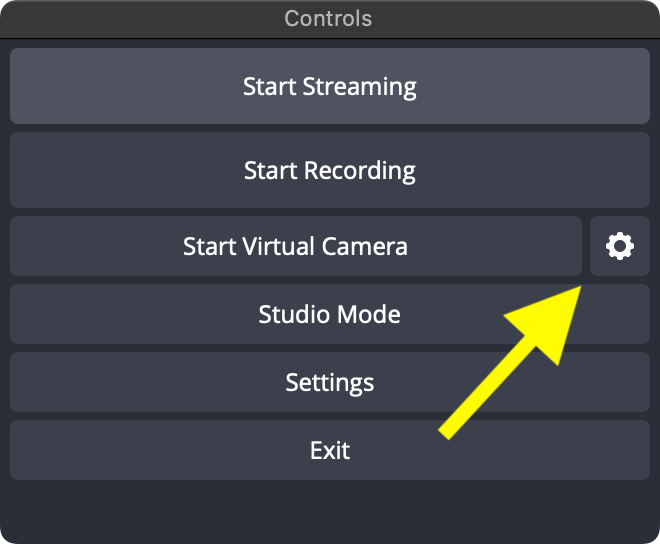
The built-in Virtual Camera feature turns OBS Studio output into a webcam source that can be used by other applications.
This is useful for video conferences, webinars, online classes, and live presentations. Instead of showing a standard webcam feed, users can display customized scenes created inside OBS Studio.
The feature eliminates the need for separate virtual camera software and expands the tool’s usefulness beyond traditional recording.
Audio Mixer
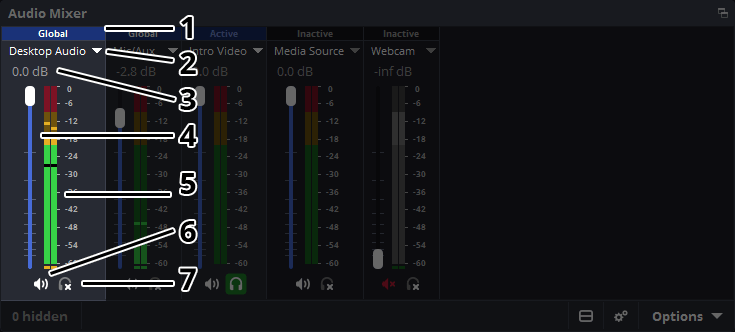
Audio management is another area where OBS Studio stands out.
Users can control desktop audio, microphones, application audio, and other sources independently. Volume adjustments can be made in real time, and audio filters help improve recording quality.
While beginners may need time to understand the routing system, the level of control available is impressive for a free application.
Plugin Support

The software also benefits from a large plugin ecosystem.
Plugins can add new transitions, automation tools, advanced recording functions, productivity enhancements, and workflow improvements. This flexibility allows users to customize the platform according to their specific needs.
As projects become more demanding, plugin support helps OBS Studio grow alongside the user rather than becoming limiting.
Cross-Platform Availability

OBS Studio supports Windows, macOS, and Linux, making it accessible to a wide range of users.
The installation process is straightforward. Most users can simply download the software, follow the setup wizard, and install obs within a few minutes.
Cross-platform support also makes it easier for creators who work across multiple devices or operating systems.
Core Features Overview
| Feature | Available |
|---|---|
| Screen Recording | Yes |
| Gameplay Recording | Yes |
| Live Streaming | Yes |
| Virtual Camera | Yes |
| Audio Mixer | Yes |
| Plugins | Yes |
| Built-In Video Editing | No |
OBS Studio Review: Real-World Experience, Pros, Cons, and Performance
Feature lists can tell you what a tool is capable of, but they rarely show what it feels like to use every day. To get a clearer picture, I spent time using OBS Studio for several common tasks, including tutorial recording, desktop capture, and gameplay recording.
Rather than treating it purely as a streaming platform, I approached it as a practical recording tool that many Windows users might install for content creation, work, or education. The experience revealed a lot of strengths, along with a few surprises that became more obvious after regular use.
My Real-World Experience With OBS Studio
Installing OBS Studio
Getting started was straightforward. The official website makes the obs studio download process simple, and the installer itself is relatively lightweight compared to some multimedia applications. After downloading the setup file, installation took only a few minutes on a Windows 11 system.
One thing I appreciated was the Auto Configuration Wizard that appears during the initial setup. Instead of forcing users to manually configure every setting from the start, the wizard suggests options based on hardware and intended usage. That feature reduces some of the friction often associated with advanced recording tools.
Users searching for an open broadcaster software download will likely have no trouble getting everything running. The installation experience feels polished and stable, with no bundled software or unnecessary prompts along the way.
Recording Tutorials and Desktop Activity
My first test involved recording browser-based tutorials and standard desktop activity. This is a common use case for educators, bloggers, and content creators who need to explain software, websites, or workflows.
Recording a browser window was simple once the correct source was selected. The captured footage looked sharp, text remained readable, and there were no noticeable synchronization issues between video and audio. Desktop capture also worked reliably during extended recording sessions.
Unlike some basic screen recorders that hide advanced options, OBS Studio gives users detailed control over resolution, frame rate, and output quality. While beginners may need a little time to understand the settings, the additional control can make a noticeable difference in the final result.
Recording Gameplay
Gameplay recording was the next area I tested. The software detected games consistently and maintained stable recordings across multiple sessions.
Capture quality was excellent when using recommended settings. Fast-moving scenes remained smooth, and recorded footage preserved detail without introducing obvious visual artifacts. This level of quality helps explain why many creators continue to rely on OBS for gaming content.
Searching for an obs download often leads users to streaming-focused discussions, but recording performance deserves equal attention. In my experience, gameplay capture felt every bit as capable as the streaming tools that usually receive the spotlight.
Everyday Workflow Experience
After several days of use, the workflow became noticeably easier. Tasks that initially felt complicated gradually turned into routine actions. Creating scenes, managing sources, and adjusting recording settings became second nature once the interface started to feel familiar.
The biggest adjustment involved understanding how everything connects together. Unlike simplified recorders that prioritize speed over flexibility, OBS Studio expects users to spend a little time learning its structure. The reward is a workflow that can adapt to many different recording situations without feeling restrictive.
What I Liked About OBS Studio
No Watermarks or Usage Limits
One of the most appealing aspects of OBS is what it does not do.
There are no recording limits, no hidden premium tiers, and no watermarks added to exported videos. Many free tools place restrictions on quality, duration, or features, but this platform provides unrestricted access from the beginning.
That alone makes it attractive for users who record frequently and want professional-looking output without recurring costs.
Surprisingly Powerful for a Free Tool
The feature set feels far more advanced than most people expect from free software.
Whether recording tutorials, presentations, webinars, or gameplay, the application provides tools that are often reserved for paid products. The ability to control encoding settings, manage multiple sources, and customize layouts creates a level of flexibility that many alternatives struggle to match.
This is one reason obs software continues to maintain such a loyal user base. It offers capabilities that can support both beginners and experienced creators without forcing them into a subscription model.
Flexible Recording Options
Flexibility is arguably the platform’s strongest advantage.
Users can capture an entire display, a specific application window, a browser source, a webcam feed, or a combination of all of them within the same project. That versatility opens the door to a wide range of recording workflows.
During testing, switching between layouts was quick and reliable. Different scenes could be created for tutorials, gameplay recordings, and webcam presentations without requiring additional software.
For content creators who regularly move between projects, that flexibility adds significant long-term value.
Strong Community and Plugin Ecosystem
Another reason many people continue using obs studios years after installation is the surrounding community.
Tutorials, troubleshooting guides, forums, and user-created resources are widely available. Finding solutions to common issues rarely requires extensive searching because someone has usually encountered the same problem before.
The plugin ecosystem adds another layer of longevity. Additional tools can expand functionality far beyond the default installation, allowing studio obs workflows to evolve as needs change.
That combination of community support and extensibility helps the software feel more like a long-term platform than a simple recorder.
What Frustrated Me About OBS Studio
No software is perfect, and this review would not be particularly useful if it focused only on strengths. While OBS Studio impressed me in several areas, there were also moments where the experience became more frustrating than expected. Most of these issues are not deal-breakers, but they are worth knowing before investing time in the platform.
The Interface Can Feel Overwhelming
The first challenge appears almost immediately after launching the application.
Instead of presenting a simplified recording screen, OBS Studio introduces users to scenes, sources, mixers, controls, and multiple configuration panels. Experienced creators may appreciate that level of control, but beginners can easily feel lost during the first few sessions.
The software assumes that users are willing to learn how its workflow operates. That approach creates flexibility later, yet it also increases the learning curve. Someone looking for a recorder that works with minimal setup may find the interface intimidating.
Audio Setup Is Not Always Beginner-Friendly
Audio configuration was the area that required the most attention during testing.
Video recording usually worked correctly from the beginning, but audio routing occasionally required adjustments. Selecting the wrong input source or overlooking a setting can result in missing microphone audio or desktop sound.
This is not necessarily a flaw in the software itself. The platform gives users extensive control over audio sources, which is one of its strengths. The downside is that additional control often means additional complexity.
For users completely new to obs screen recording, audio setup can become the most confusing part of the learning process.
No Built-In Video Editing
Another limitation becomes apparent after recording is finished.
OBS Studio is designed to record and stream content, not edit it. Once footage has been captured, users still need a separate video editor for trimming clips, adding transitions, creating effects, or assembling a finished project.
Some competing tools combine recording and editing into a single workflow. That convenience is missing here.
As a result, creators who want an all-in-one solution may need to add another application to their toolkit after recording sessions are complete.
Some Features Require Trial and Error
Although documentation and tutorials are widely available, certain settings still require experimentation.
Finding the ideal balance between quality, performance, and file size often involves testing different configurations. New users may spend time adjusting bitrate settings, encoder options, and recording profiles before discovering what works best for their hardware.
This is one area where obs software can feel more technical than beginner-focused alternatives. The flexibility is valuable, but it comes with a level of complexity that not everyone will enjoy.
OBS Studio Performance and Resource Usage
Performance is often one of the biggest concerns for anyone considering a screen recorder. Recording software runs alongside games, browsers, editing tools, and other applications, so efficiency matters. During testing, OBS Studio generally delivered reliable results while maintaining a reasonable balance between quality and resource consumption.
Performance on Windows 11
Testing was performed primarily on a Windows 11 system using typical recording scenarios, including desktop capture, browser-based tutorials, and gameplay footage.
The application launched quickly, remained stable during extended sessions, and did not experience crashes throughout testing. Recording sessions completed successfully even when multiple sources were active at the same time.
For users searching for the best free screen recorder for windows 11, stability is one of the strongest arguments in favor of OBS Studio. Reliability is often more important than flashy features, and the software performed consistently across different workloads.
CPU and Memory Usage
Resource consumption varied depending on recording settings and encoder selection.
Under moderate recording conditions, CPU usage remained reasonable and never felt excessive. More demanding settings naturally increased system load, especially during gameplay recording, but the impact stayed within expectations for software with this level of functionality.
Memory usage was similarly manageable. While OBS Studio is not the lightest recording tool available, it does not feel unnecessarily bloated either.
Users with modern hardware should have little trouble running it alongside browsers, communication apps, and creative tools.
Recording Quality
Recording quality was one of the strongest aspects of the experience.
Desktop recordings appeared sharp, text remained readable, and gameplay footage maintained smooth motion throughout testing. With the right configuration, video output looked professional enough for tutorials, YouTube uploads, and content creation projects.
The overall quality advantage becomes especially noticeable when compared with basic free recorders that offer fewer customization options. In many situations, obs screen recording can produce results comparable to premium products when configured correctly.
Low-End PC Considerations
Users with older hardware may need to manage expectations.
The software can run on lower-end systems, but performance depends heavily on recording resolution, frame rate, encoder selection, and background activity. Aggressive settings can quickly increase resource usage and affect recording smoothness.
Fortunately, OBS Studio provides enough configuration options to reduce the workload when necessary. Lowering resolution or adjusting encoding settings can make a meaningful difference on less powerful machines.
That flexibility helps the software remain usable across a wide range of hardware configurations rather than targeting only high-performance PCs.
Performance Summary
| Area | Observation |
|---|---|
| Startup Speed | Fast |
| Recording Stability | Excellent |
| CPU Usage | Moderate |
| Memory Usage | Moderate |
| Output Quality | High |
After extensive testing, performance proved to be one of the application’s most dependable qualities. While there is a learning curve involved in getting the best results, the software rewards that effort with stable recordings, strong output quality, and enough flexibility to accommodate both casual and advanced users.
Why OBS Studio Remains So Popular
Software trends change quickly. Tools that dominate one year can become irrelevant a few years later as user preferences, technology, and competing products evolve. Yet OBS Studio has managed to remain a leading choice for recording and streaming despite increasing competition from both free and paid alternatives.
Part of that success comes from its ability to serve different audiences at the same time. A beginner can use it to record a tutorial, while an experienced creator can build a complex production workflow with multiple scenes, cameras, audio sources, and automation tools. Few free applications manage to balance accessibility and depth as effectively.
Another factor is reputation. Over time, creators have built tutorials, guides, plugins, and communities around the platform. New users rarely start from scratch because there is already an enormous amount of information available online. That ecosystem creates confidence and makes adoption easier for people who might otherwise hesitate to try a more advanced recording tool.
Widespread Adoption Among Streamers
The popularity of OBS is not based on marketing claims alone. Real-world adoption provides a clearer picture of how widely it is used.
According to a 2026 streamer industry report, roughly seven out of ten streamers rely on OBS Studio as their primary broadcasting software, making it one of the most widely adopted streaming tools among content creators.
That level of adoption does not happen by accident.
Creators tend to be practical when selecting software. If a platform causes constant technical issues, limits creative control, or becomes unreliable during live broadcasts, users eventually move elsewhere. The fact that so many creators continue using OBS suggests a strong level of trust built over many years.
The platform also benefits from ecosystem maturity. New users can find setup guides, troubleshooting resources, optimization tips, and workflow recommendations with minimal effort. Experienced creators contribute tutorials and educational content, while developers continue expanding the software through plugins and community projects.
This mature ecosystem reduces barriers for new users. Instead of learning everything independently, creators can build upon knowledge already shared by millions of people worldwide.
The platform’s reputation for reliability also plays a role. Whether users are producing tutorials, recording gameplay footage, or handling obs streaming sessions, stability matters. A tool that consistently performs well naturally earns long-term loyalty.
The Appeal of Open-Source Software
One of the most important reasons behind the platform’s longevity is its open-source foundation.
Many software products depend entirely on corporate decisions. Features can disappear, subscription costs can increase, and development priorities may change based on business goals. Open-source projects operate differently.
Development is visible to the community, and contributions come from developers around the world. That transparency creates a level of trust that is often difficult for commercial products to replicate.
Users can see how the software evolves, report issues, suggest improvements, and participate in discussions about future development. This collaborative approach helps ensure that changes are guided by real-world needs rather than purely financial considerations.
Community involvement also contributes to innovation. New ideas often emerge from users who rely on the software daily and understand practical challenges better than anyone else. Over time, these contributions help improve performance, usability, and feature availability.
Long-term support is another advantage.
Because the project is not dependent on a single company or business model, it is less vulnerable to sudden strategic changes. That stability encourages creators to invest time learning the platform without worrying that critical features might disappear unexpectedly.
For many users, this combination of transparency, community development, and long-term sustainability makes OBS Studio feel like a safer long-term choice than some proprietary alternatives.
Growing Demand for Recording and Streaming Tools
The broader creator economy also helps explain why OBS continues to attract new users.
Video content is no longer limited to professional media organizations. Independent creators, educators, trainers, businesses, and hobbyists all produce digital content on a regular basis. As video becomes more important across industries, demand for recording and broadcasting tools continues to grow.
Based on industry research, the global live-streaming market is expected to grow from approximately $87.5 billion to more than $345 billion by 2030, highlighting the increasing demand for recording and broadcasting tools such as OBS Studio.
Those numbers reflect a much larger trend.
More people are creating content than ever before. Online courses, gaming channels, webinars, tutorials, podcasts, product demonstrations, and live events all require tools capable of capturing and distributing high-quality video.
The growing demand for content creation naturally increases interest in reliable recording software. Applications that offer professional capabilities without significant financial barriers are especially attractive to individuals and small teams.
This is one reason OBS Studio continues to remain relevant. It sits at the intersection of affordability, flexibility, and capability. As the creator economy expands, demand for tools with those characteristics is unlikely to disappear.
Who Should Use OBS Studio?
Not every recording tool serves the same audience. While some products prioritize simplicity, others focus on flexibility and advanced control. OBS Studio clearly belongs in the second category.
Best For Content Creators
Content creators who regularly produce tutorials, educational videos, reviews, demonstrations, or online courses can benefit significantly from the platform. The ability to manage multiple sources, customize layouts, and control recording quality makes it suitable for a wide variety of projects.
Many creators specifically choose an obs studio screen recorder because it allows them to build professional-looking recording setups without paying for premium software.
Best For Gamers
Gamers who record gameplay footage or create gaming content will likely appreciate the platform’s capture capabilities. Support for game capture, scene switching, and customizable recording settings provides a strong foundation for gaming workflows.
Best For Streamers
Streaming remains one of the platform’s strongest use cases. Users who broadcast regularly can take advantage of advanced controls, multiple scene configurations, overlays, and audio management tools.
Best For Advanced Users
People who enjoy customizing workflows, optimizing settings, and exploring advanced features are likely to get the most value from OBS Studio. The learning curve becomes easier to justify when flexibility is a priority.
Who Should Avoid OBS Studio?
A balanced review should also identify situations where another solution may be a better fit.
Users Who Want One-Click Recording
Some users simply want to launch an application, press Record, and save a video. While OBS Studio can certainly record quickly once configured, it is not designed around maximum simplicity.
Users Looking for Built-In Editing
The platform focuses on recording and broadcasting. Users who want trimming, effects, transitions, and editing tools within the same application may prefer software that combines both workflows.
Users Who Dislike Technical Setup
Although the software has become more beginner-friendly over the years, some setup and experimentation are still required. Users who dislike adjusting settings or troubleshooting occasional configuration issues may find simpler alternatives more comfortable.
Final Verdict
OBS Studio delivers a level of flexibility that is difficult to find in free software. Recording quality is excellent, customization options are extensive, and the surrounding ecosystem continues to provide long-term value for creators.
The learning curve remains the biggest drawback. New users should expect to spend some time understanding scenes, sources, audio routing, and recording settings before everything feels comfortable.
That investment is often worthwhile.
OBS Studio remains one of the most capable free screen recorders available today. Its flexibility and feature set rival many paid tools, but users should be prepared for a steeper learning curve than beginner-focused alternatives.
FAQs About OBS Studio
Can OBS Studio be trusted?
Yes. OBS Studio has been used by creators, educators, and streamers for years. Its open-source development model and large user community contribute to its strong reputation and transparency.
Is OBS Studio any good?
It is one of the most capable free recording and streaming tools available. While the interface requires some learning, the feature set competes with many paid alternatives.
Is OBS Studio free and safe?
Yes. The software is completely free to use and does not include watermarks or mandatory subscriptions. Downloading it from the official website is generally considered safe.
What are the disadvantages of OBS Studio?
The main drawbacks are its learning curve, lack of built-in video editing, and the time sometimes required to configure audio and recording settings properly.
Is there a better option than OBS?
That depends on your needs. Some users may prefer Bandicam, Streamlabs Desktop, or ScreenPal for their simpler workflows, while others will value the flexibility OBS provides.


